# "Kla.TV-Offline" преузимање и ажурирање 🔄

# "Kla.TV-Offline" ажурирање помоћу WinSCP (само Windows)

<p class="callout info"><span style="color: rgb(0, 0, 0);">**WinSCP може успорити брзину преузимања. Стога препоручујемо да за преузимање целе архиве користите FileZilla: [https://wiki.kla.tv/books/sr-klatv-offline/page/klatv-offline-azuriranje-pomocu-filezilla-maclinuxwindows](https://wiki.kla.tv/books/sr-klatv-offline/page/klatv-offline-azuriranje-pomocu-filezilla-maclinuxwindows ""Kla.TV-Offline" ажурирање помоћу Filezilla (Mac,Linux,Windows)")  
За ажурирање предлажемо WinSCP.**</span></p>

### <span style="color: rgb(255, 255, 255);">**<span style="background-color: rgb(29, 62, 98);"><span style="background-color: rgb(45, 194, 107);"><span style="background-color: rgb(29, 62, 98);"> WinSCP или FileZilla?</span></span> </span>**</span>

<div class="responsive-iframe" id="bkmrk-"><div class="responsive-iframe">  
</div></div>### <span style="color: rgb(255, 255, 255);">**<span style="background-color: rgb(29, 62, 98);"><span style="background-color: rgb(45, 194, 107);"><span style="background-color: rgb(120, 210, 40);"> 1 </span></span></span> <span style="background-color: rgb(29, 62, 98);"><span style="background-color: rgb(45, 194, 107);"><span style="background-color: rgb(29, 62, 98);"> Преузми</span></span> WinSCP </span>**</span>

<span style="color: rgb(29, 62, 98);">Прво ти треба датотека за инсталацију. Њу можеш да преузмеш кликом на линк:</span>

<p class="callout success">**[КЛИКНИ ОВДЕ (https://winscp.net/download.php)](https://winscp.net/download.php "Link zum Download")**</p>

### <span style="color: rgb(255, 255, 255);">**<span style="background-color: rgb(29, 62, 98);"><span style="background-color: rgb(45, 194, 107);"><span style="background-color: rgb(120, 210, 40);"> 2 </span></span></span> <span style="background-color: rgb(29, 62, 98);"><span style="background-color: rgb(45, 194, 107);"><span style="background-color: rgb(29, 62, 98);"> Инсталирај</span></span> WinSCP </span>**</span>

<div class="responsive-iframe" id="bkmrk--1"><div class="responsive-iframe"><div class="responsive-iframe">  
</div></div></div>### <span style="color: rgb(255, 255, 255);">**<span style="background-color: rgb(29, 62, 98);"><span style="background-color: rgb(120, 210, 40);"> 3 </span></span> <span style="background-color: rgb(29, 62, 98);"> Повежи WinSCP са сервером </span>**</span>

<div class="responsive-iframe" id="bkmrk--2"><div class="responsive-iframe"><div class="responsive-iframe"><div class="responsive-iframe"><div class="responsive-iframe">  
</div></div></div></div></div>### <span style="color: rgb(255, 255, 255);">**<span style="background-color: rgb(29, 62, 98);"><span style="background-color: rgb(120, 210, 40);"> 4 </span></span> <span style="background-color: rgb(29, 62, 98);"> Подеси програм </span>**</span>

<div class="responsive-iframe" id="bkmrk--3"><div class="responsive-iframe"><div class="responsive-iframe">  
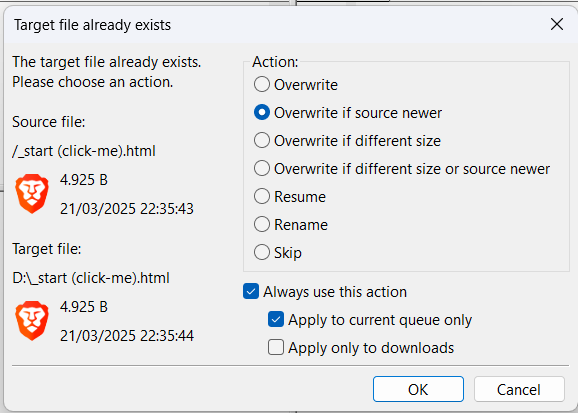
</div></div></div>### <span style="color: rgb(255, 255, 255);">**<span style="background-color: rgb(29, 62, 98);"><span style="background-color: rgb(120, 210, 40);"> 5 </span></span> <span style="background-color: rgb(29, 62, 98);"> Синхронизуј твоју архиву </span>**</span>

<div class="responsive-iframe" id="bkmrk-einstellungen-f%C3%BCrs-s"><div class="responsive-iframe">  
</div><div class="responsive-iframe">  
</div><div class="responsive-iframe"><span style="color: rgb(29, 62, 98);">**Подешавање за синхронизацију:**</span></div></div>[![Screenshot 2025-04-24 203839.png](https://wiki.kla.tv/uploads/images/gallery/2025-04/PS62AZ43ZtZepwm9-screenshot-2025-04-24-203839.png)](https://wiki.kla.tv/uploads/images/gallery/2025-03/sfc7JRnnMHPMUm9C-nummerierung.png)[![Screenshot 2025-04-24 203744.png](https://wiki.kla.tv/uploads/images/gallery/2025-04/scaled-1680-/4MeV2oNJFXst3k7d-screenshot-2025-04-24-203744.png)](https://wiki.kla.tv/uploads/images/gallery/2025-04/4MeV2oNJFXst3k7d-screenshot-2025-04-24-203744.png)

### <span style="color: rgb(255, 255, 255);">**<span style="background-color: rgb(29, 62, 98);"><span style="background-color: rgb(120, 210, 40);"> ГОТОВО </span></span>**</span>

# "Kla.TV-Offline" ажурирање помоћу Filezilla (Mac,Linux,Windows)

Овај видео-снимак ти показује, како се то ради:

<iframe allowfullscreen="allowfullscreen" frameborder="0" height="332" src="https://www.kla.tv/index.php?a=showembed&vidid=37260#s=sr" width="590"></iframe>


### <span style="color: rgb(255, 255, 255);">**<span style="background-color: rgb(29, 62, 98);"><span style="background-color: rgb(45, 194, 107);"><span style="background-color: rgb(29, 62, 98);"> WinSCP или FileZilla?</span></span> </span>**</span>

#### <span style="color: rgb(255, 255, 255);">**<span style="background-color: rgb(164, 0, 0);"> 1 </span> <span style="background-color: rgb(29, 62, 98);"><span style="background-color: rgb(45, 194, 107);"><span style="background-color: rgb(29, 62, 98);"> Преузми</span></span> FileZilla </span>**</span>

Прво ти је потребна инсталациона датотека. Њу можеш преузети кликом на линк:

<p class="callout success">**[КЛИКНИ ОВДЕ (https://filezilla-project.org/download.php)](https://www.heise.de/download/product/filezilla-18785/download/danke?id=a7ddf635-1e21-48f4-9add-e7612e13c3b2)**</p>

#### <span style="color: rgb(255, 255, 255);">**<span style="background-color: rgb(164, 0, 0);"> 2 </span> <span style="background-color: rgb(29, 62, 98);"><span style="background-color: rgb(45, 194, 107);"><span style="background-color: rgb(29, 62, 98);"> </span></span>Инсталирај FileZilla </span>**</span>

#### <span style="color: rgb(255, 255, 255);">**<span style="background-color: rgb(164, 0, 0);"> 3 </span> <span style="background-color: rgb(29, 62, 98);"><span style="background-color: rgb(45, 194, 107);"><span style="background-color: rgb(29, 62, 98);"> </span></span>Повежи FileZilla са сервером </span>**</span>

#### <span style="color: rgb(255, 255, 255);">**<span style="background-color: rgb(164, 0, 0);"> 4 </span> <span style="background-color: rgb(29, 62, 98);"><span style="background-color: rgb(45, 194, 107);"><span style="background-color: rgb(29, 62, 98);"> Синхронизуј твоју архиву</span></span></span>**</span><span style="color: rgb(255, 255, 255);">**<span style="background-color: rgb(29, 62, 98);"> </span>**</span>

<div class="responsive-iframe" id="bkmrk--3"></div><div class="responsive-iframe" id="bkmrk--4"></div>[![Screenshot 2025-04-24 200358.png](https://wiki.kla.tv/uploads/images/gallery/2025-04/BOEHNSeLHY1bQ8hR-screenshot-2025-04-24-200358.png)](https://wiki.kla.tv/uploads/images/gallery/2025-03/FMg5KlE97WgkdEbI-grafik.png)

### <span style="color: rgb(255, 255, 255); background-color: rgb(164, 0, 0);"> **ГОТОВО** </span>

# "Kla.TV-Offline" ажурирање помоћу апликације Kla.TV-Downloader

Kla.TV-Downloader апликације је још у изградњи и ова функција још није доступна.