# Technische Anleitungen

# Wie lange dauert es "Kla.TV-Offline" über das Internet auf eine Festplatte herunterzuladen?

## <span data-syno-text="true">1. Speedtest</span>

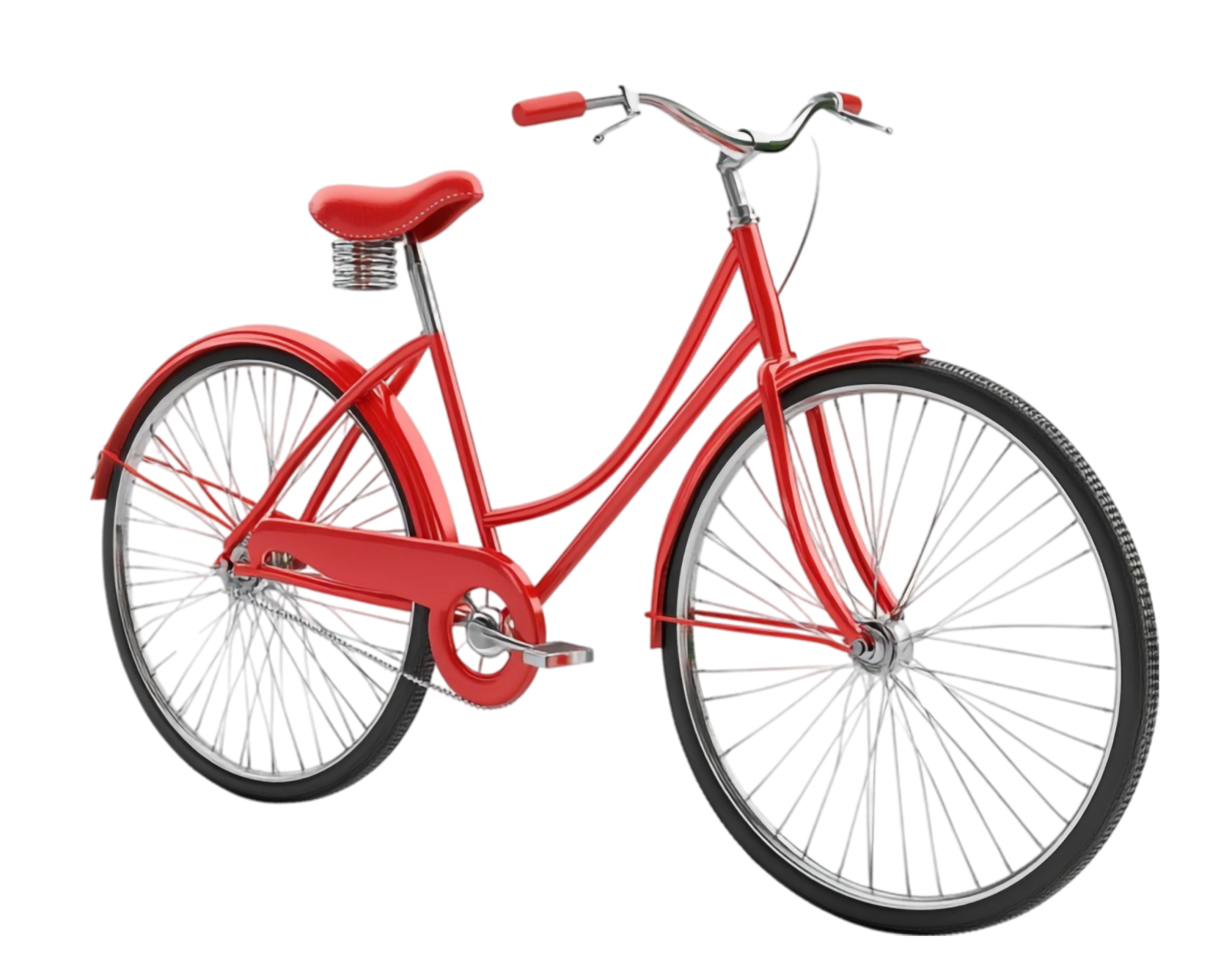
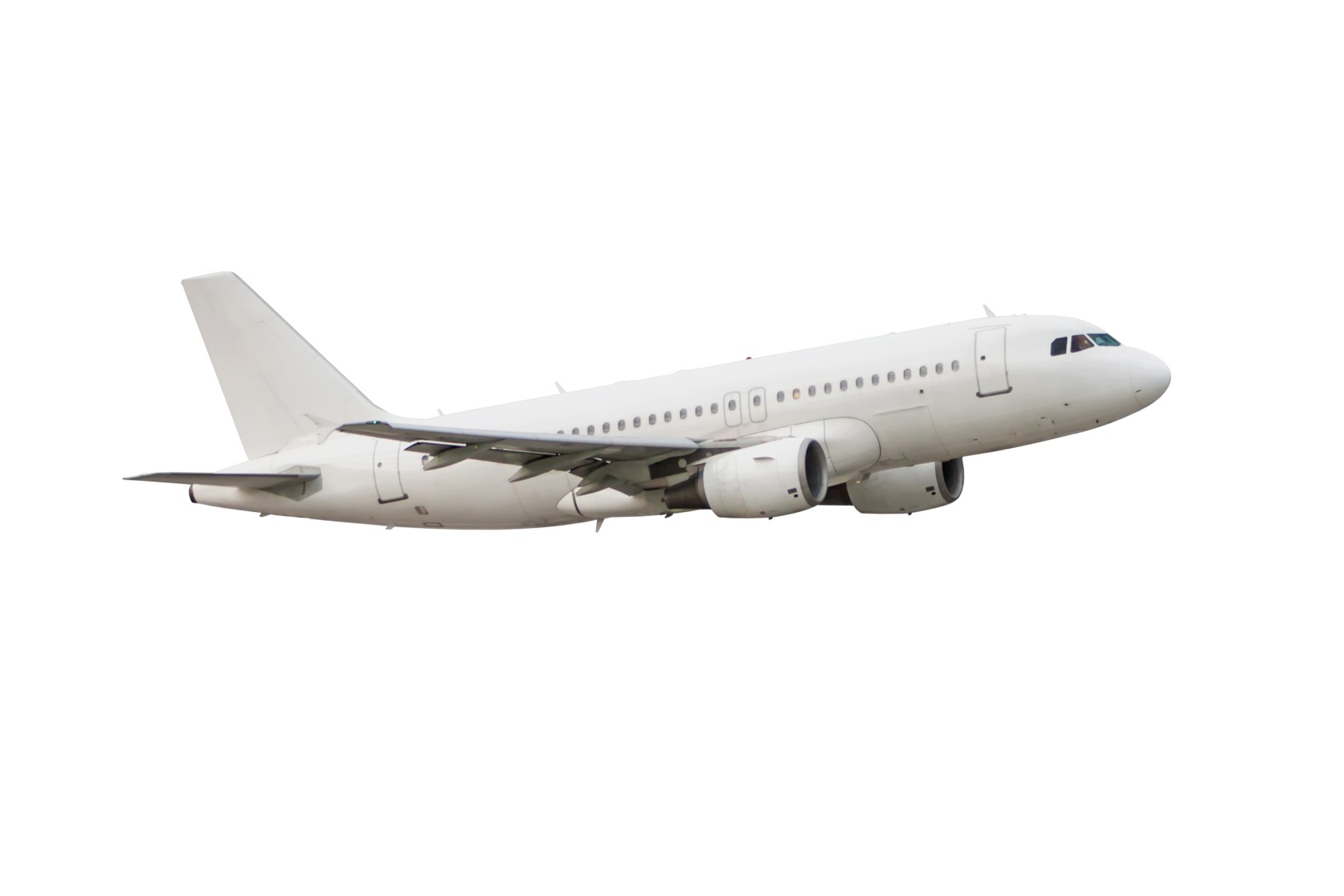
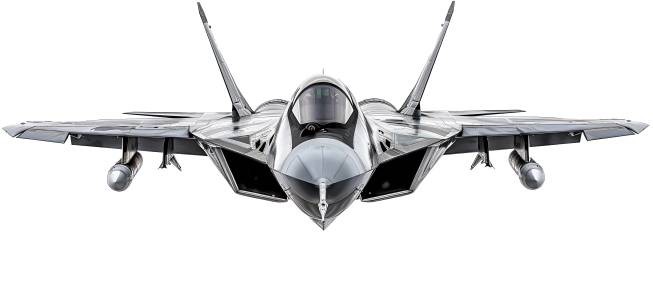
<span data-syno-text="true">Mache zuerst einen Speedtest (siehe Link unterhalb) und finde so heraus, welches "Fahrzeug" (Internet-Geschwindigkeit) du hast. In der Tabelle (unter 2.) erkennst du, wie lange du mit dieser Geschwindigkeit brauchst, um Kla.TV-Offline herunterzuladen.</span>

##### <span data-syno-text="true">[https://www.speedtest.net/](https://www.speedtest.net/)</span>

<span data-syno-text="true">Auf der Seite drückst du auf GO, der Test dauert kurz und dann werden dir die Resultate angezeigt, z.B. wie folgt:</span>

[![image.png](https://wiki.kla.tv/uploads/images/gallery/2025-03/scaled-1680-/bUhCVcS7daJjskC6-image.png)](https://www.speedtest.net)

Du nimmst die ersten beiden Zahlen unter "Download". Das ist deine Download-Geschwindigkeit in Mbps

## 2. Download-Dauer von "Kla.TV-Offline"

<table border="1" id="bkmrk-fahrzeug-download-ge" style="border-collapse: collapse; width: 100%; height: 389.563px;"><colgroup><col style="width: 33.3745%;"></col><col style="width: 33.3745%;"></col><col style="width: 33.3745%;"></col></colgroup><tbody><tr style="height: 61.5938px;"><td style="height: 61.5938px;">##### <span style="background-color: rgb(251, 238, 184);">**Fahrzeug**</span>

</td><td style="height: 61.5938px;">##### <span style="background-color: rgb(251, 238, 184);">**Deine Download-Geschwindigkeit**</span>

</td><td style="height: 61.5938px;">##### <span style="background-color: rgb(251, 238, 184);">**Dauer für den Download (1.7TB)**</span>

</td></tr><tr style="height: 119.391px;"><td style="height: 119.391px;">![7932775.jpg](https://wiki.kla.tv/uploads/images/gallery/2025-03/scaled-1680-/cwLni4x4o3nTziDr-7932775.jpg)  
Dreirad

</td><td style="height: 119.391px;">#### **0.25 - 1 Mbps**

</td><td style="height: 119.391px;">##### <span style="background-color: rgb(191, 237, 210);">ca. 300 Tage</span>

</td></tr><tr style="height: 29.7969px;"><td style="height: 29.7969px;">![InlineSkates.jpg](https://wiki.kla.tv/uploads/images/gallery/2025-03/scaled-1680-/qN1WpSWShoxB6Fl9-inlineskates.jpg)  
Inline-Skates

</td><td style="height: 29.7969px;">#### **2 - 4 Mbps**

</td><td style="height: 29.7969px;">##### <span style="background-color: rgb(191, 237, 210);">ca. 50 Tage</span>

</td></tr><tr style="height: 29.7969px;"><td style="height: 29.7969px;">![Velo01.png](https://wiki.kla.tv/uploads/images/gallery/2025-03/scaled-1680-/DYwmfTklIE5Hr0qS-velo01.png)  
Fahrrad

</td><td style="height: 29.7969px;">#### **5 - 9 Mbps**

</td><td style="height: 29.7969px;">##### <span style="background-color: rgb(191, 237, 210);">ca. 25 Tage</span>

</td></tr><tr style="height: 29.7969px;"><td style="height: 29.7969px;">![Car.jpg](https://wiki.kla.tv/uploads/images/gallery/2025-03/scaled-1680-/zA0nL14GpyVwLGgT-car.jpg)  
Auto

</td><td style="height: 29.7969px;">#### **10 - 20 Mbps**

</td><td style="height: 29.7969px;">##### <span style="background-color: rgb(191, 237, 210);">ca. 10 Tage</span>

</td></tr><tr style="height: 29.7969px;"><td style="height: 29.7969px;">![Sportcar.png](https://wiki.kla.tv/uploads/images/gallery/2025-03/scaled-1680-/2rwcYTxGJZOP0D2V-sportcar.png)  
Sportwagen

</td><td style="height: 29.7969px;">#### **30 - 50 Mbps**

</td><td style="height: 29.7969px;">##### <span style="background-color: rgb(191, 237, 210);">ca. 3 Tage</span>

</td></tr><tr style="height: 29.7969px;"><td style="height: 29.7969px;">![RacingCar.jpg](https://wiki.kla.tv/uploads/images/gallery/2025-03/scaled-1680-/4tjCRXDXPRUTV5CO-racingcar.jpg)  
Formel 1

</td><td style="height: 29.7969px;">#### **100 Mbps**

</td><td style="height: 29.7969px;">##### <span style="background-color: rgb(191, 237, 210);">ca. 2 Tage</span>

</td></tr><tr style="height: 29.7969px;"><td style="height: 29.7969px;">![passenger-aircraft-flying-isolated-white-background.jpg](https://wiki.kla.tv/uploads/images/gallery/2025-03/scaled-1680-/gJapWDLH2PoceOk4-passenger-aircraft-flying-isolated-white-background.jpg)  
Flugzeug

</td><td style="height: 29.7969px;">#### **200 Mbps**

</td><td style="height: 29.7969px;">##### <span style="background-color: rgb(191, 237, 210);">ca. 24 h</span>

</td></tr><tr style="height: 29.7969px;"><td style="height: 29.7969px;">![Fighter.jpg](https://wiki.kla.tv/uploads/images/gallery/2025-03/scaled-1680-/9O1RrWtYUtV54dPn-fighter.jpg)  
Düsenjet

</td><td style="height: 29.7969px;">#### **500 Mbps und mehr**

</td><td style="height: 29.7969px;">##### <span style="background-color: rgb(191, 237, 210);">&lt; 24 h </span>

</td></tr></tbody></table>

# Wie lange dauert das Kopieren von "Kla.TV-Offline" von einer Festplatte auf ein oder zwei andere?

##### <span style="background-color: rgb(251, 238, 184);">Wenn du ,Kla.TV-Offline‘ (1.7 TB) auf 1ne Festplatte kopierst, rechne mit 12 Stunden</span>

[![image.png](https://wiki.kla.tv/uploads/images/gallery/2025-03/scaled-1680-/pLe2vYlTz5WgM04h-image.png)](https://wiki.kla.tv/uploads/images/gallery/2025-03/pLe2vYlTz5WgM04h-image.png)

##### <span style="background-color: rgb(251, 238, 184);">Wenn du ,Kla.TV-Offline‘ (1.7 TB) auf 2 Festplatten gleichzeitig kopierst, rechne mit 16 Stunden</span>

[![image.png](https://wiki.kla.tv/uploads/images/gallery/2025-03/scaled-1680-/DUIVgr377ndYmNL2-image.png)](https://wiki.kla.tv/uploads/images/gallery/2025-03/DUIVgr377ndYmNL2-image.png)

##### <span style="background-color: rgb(251, 238, 184);">Dies gilt für die günstigsten Festplatten auf dem Markt, für ca. 70€. Teurere Festplatten sind in der Regel schneller.</span>

 ![image.png](https://wiki.kla.tv/uploads/images/gallery/2025-03/scaled-1680-/cuDOUeRItuj6tREF-image.png)

# Wie formatiere ich meine Festplatte für "Kla.TV-Offline" korrekt? (exFAT)

##### Damit die Festplatte auf jedem System gelesen werden kann, ist es wichtig, dass sie richtig formatiert ist. Dann kann sie auf Mac, Windows und Linux gelesen und beschrieben werden.

<p class="callout danger">**Achtung:** alle Daten auf der Festplatte werden nach diesem Vorgang unwiderruflich gelöscht! Führe diesen Schritt durch, <span style="text-decoration: underline;">bevor</span> du etwas auf die Festplatte kopiert hast!</p>


## [![grafik.png](https://support.elaion.ch/uploads/images/gallery/2023-05/scaled-1680-/OQzkqjRNBQBbZ3N4-grafik.png) ](https://support.elaion.ch/uploads/images/gallery/2023-05/OQzkqjRNBQBbZ3N4-grafik.png)**Anleitung für Windows**

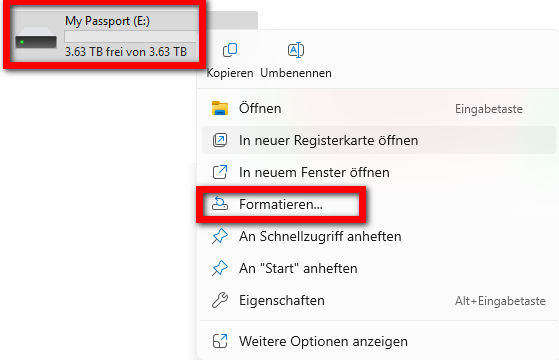
- <span style="background-color: rgb(236, 202, 250);"><span style="background-color: rgb(191, 237, 210);">Mache einen Rechtsklick auf die Festplatte &gt; wähle "Formatieren"</span>  
      
    </span>[![image.png](https://wiki.kla.tv/uploads/images/gallery/2025-03/scaled-1680-/S2J6SAs5mI66IZ2M-image.png)](https://wiki.kla.tv/uploads/images/gallery/2025-03/S2J6SAs5mI66IZ2M-image.png)
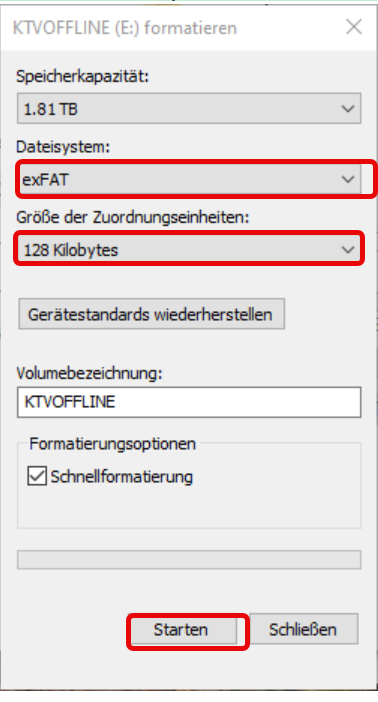
- <span style="background-color: rgb(191, 237, 210);">Wähle beim Dateisystem "exFAT" und drücke "Starten"  
    </span>  
    [![grafik.png](https://wiki.kla.tv/uploads/images/gallery/2025-03/scaled-1680-/8snRkUL8vzYZGtQf-grafik.png)](https://wiki.kla.tv/uploads/images/gallery/2025-03/8snRkUL8vzYZGtQf-grafik.png)

## ![image.png](https://support.elaion.ch/uploads/images/gallery/2022-08/scaled-1680-/n6YA4MHBcekCfTEp-image.png)**Anleitung für MacOS**

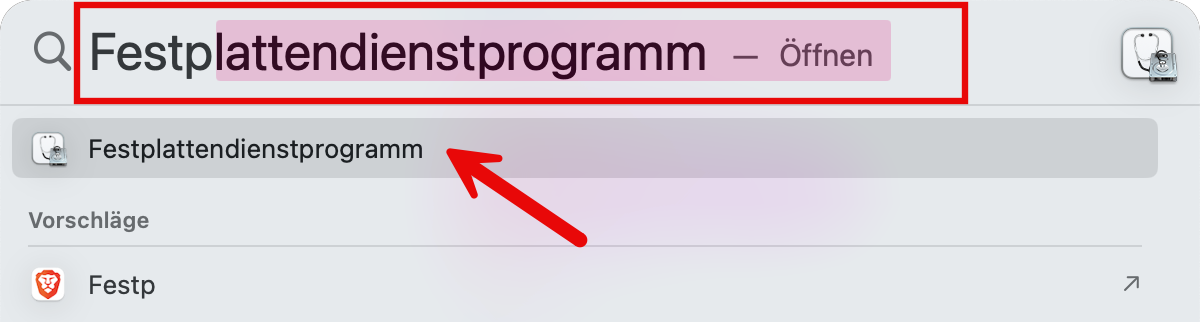
- <span style="background-color: rgb(251, 238, 184);">Navigiere in der Menüleiste des Macs auf die Lupe und gebe in der Suche "Festplattendienstprogramm" ein:  
    </span>[![image.png](https://wiki.kla.tv/uploads/images/gallery/2025-03/scaled-1680-/5ZgzTFAPl9gc1nPO-image.png)](https://wiki.kla.tv/uploads/images/gallery/2025-03/5ZgzTFAPl9gc1nPO-image.png)<span style="background-color: rgb(251, 238, 184);">  
    </span>![image.png](https://wiki.kla.tv/uploads/images/gallery/2025-03/scaled-1680-/RCIzNC6WSof5Qinr-image.png)<span style="background-color: rgb(251, 238, 184);">  
      
    </span>
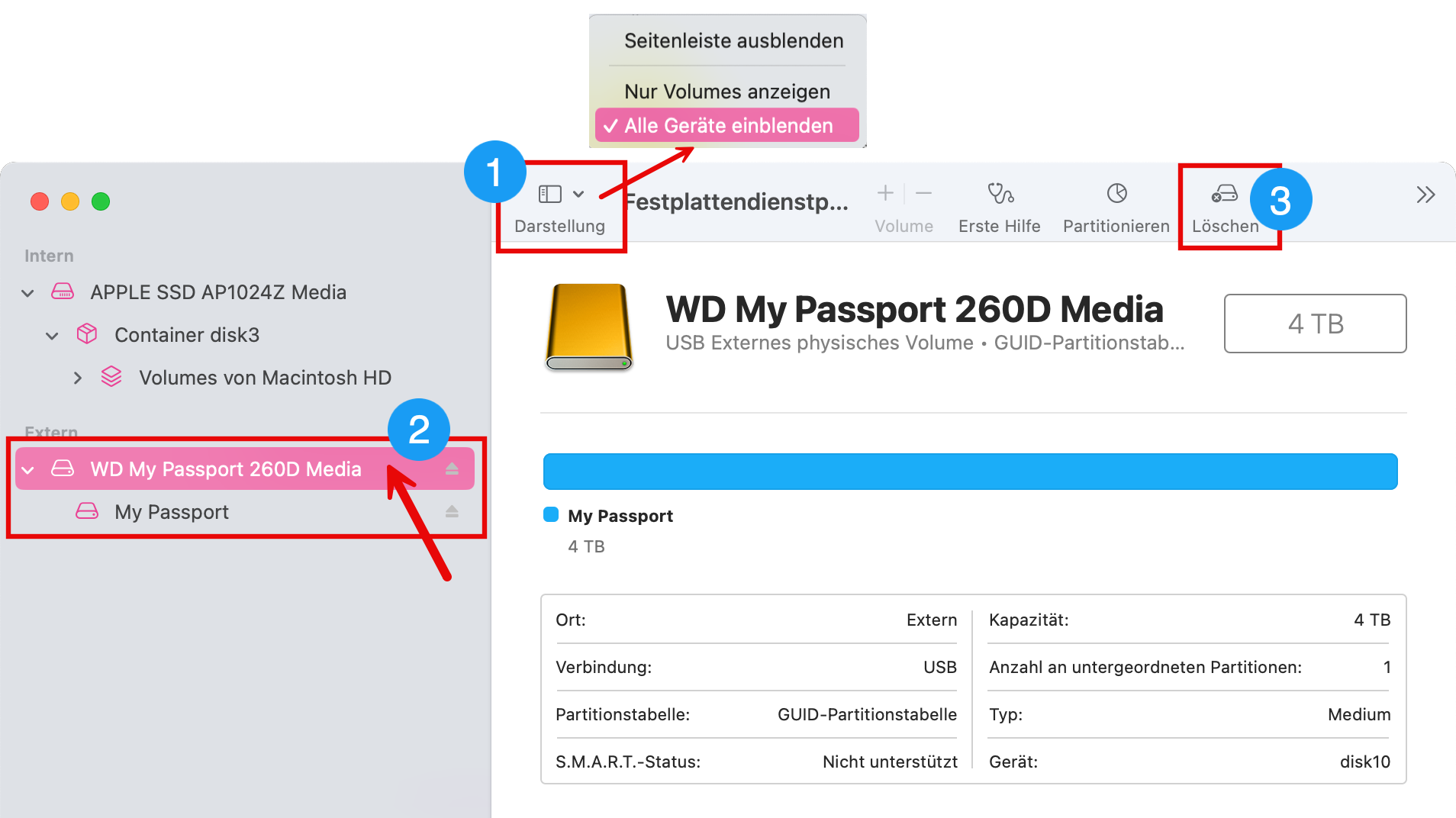
- <span style="background-color: rgb(251, 238, 184);">Wähle ❶ "Darstellung" &gt; "Alle Geräte einblenden"</span>
- <span style="background-color: rgb(251, 238, 184);">Wähle in der ❷ Seitenleiste das Speichermedium aus, das du formatieren möchtest. *ACHTUNG: sei dir gewiss, dass du die richtige Festplatte gewählt hast.* (Klicke oberhalb des Festplattennamens drauf)</span>
- <span style="background-color: rgb(251, 238, 184);">Klicke auf ❸ "Löschen"  
    </span>[![image.png](https://wiki.kla.tv/uploads/images/gallery/2025-03/scaled-1680-/HTzL7ReDnYQ66Gq9-image.png)](https://wiki.kla.tv/uploads/images/gallery/2025-03/HTzL7ReDnYQ66Gq9-image.png)  
    <span style="background-color: rgb(251, 238, 184);">  
    </span>
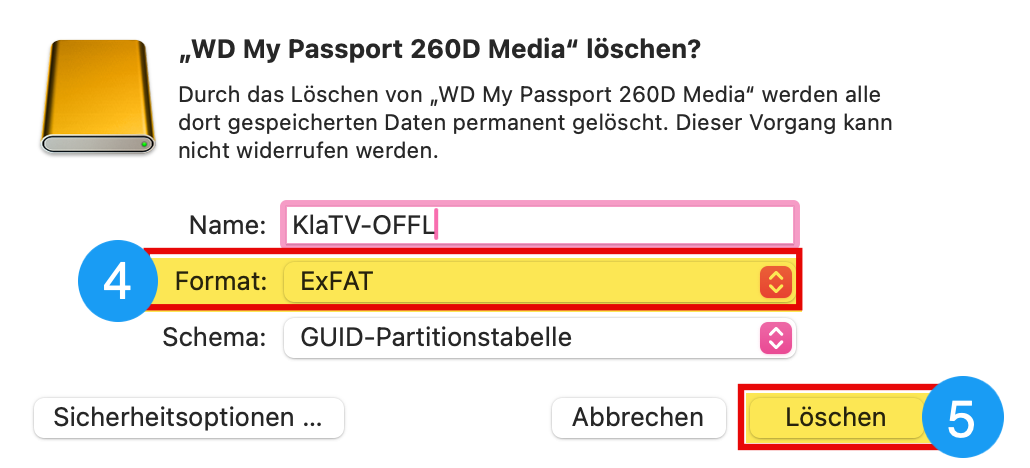
- <span style="background-color: rgb(251, 238, 184);">Wähle bei ❹ Format "ExFAT" und klicke danach auf ❺ "Löschen"</span>  
    [![image.png](https://wiki.kla.tv/uploads/images/gallery/2025-03/scaled-1680-/byaqAmpliNYz43kE-image.png)](https://wiki.kla.tv/uploads/images/gallery/2025-03/byaqAmpliNYz43kE-image.png)

## [![grafik.png](https://support.elaion.ch/uploads/images/gallery/2023-05/scaled-1680-/HAfquWaq0hyk9mn0-grafik.png) ](https://support.elaion.ch/uploads/images/gallery/2023-05/HAfquWaq0hyk9mn0-grafik.png)**Anleitung für Linux**

<div class="Article__Chapter fb-col-md-10 fb-col-lg-10  fb-direction-column-mu fb-order-5" id="bkmrk-starten-den-linux-re"><div class="mt-sm">1. Starte den Linux-Rechner und schließe die externe Festplatte an.
2. Nun benötigst du das Programm "GParted", das unter den meisten Linux-Versionen bereits vorinstalliert ist.
3. Öffne GParted und gebe dein Benutzer-Passwort ein.
4. Klicke auf das Auswahlfeld rechts oben und wählen die zu formatierende Festplatte aus.
5. Wähle wiederum die entsprechenden Partitionen aus, klicke mit der rechten Maustaste darauf und gehen auf "Aushängen".
6. Klicke erneut mit der rechten Maustaste und wähle "Formatieren als" sowie das gewünschte Dateisystem (exFAT) aus.
7. Klicke oberhalb auf das grüne Häkchen und bestätige nochmals. Die Festplatte wird nun formatiert.

</div></div><figure class="Article__Image mt-md fb-col-md-10 fb-col-lg-10 fb-order-5" id="bkmrk-">[<div class="Article__ImageWrapper shadow-2dp">![Festplatte unter Linux formatieren](https://im.contentlounge.net/styles/manual_crop/s3/festplatte-unter-linux-formatieren_54788448.png?im=Resize%3D%281200%2C675%29%2Caspect%3Dfit%2CAspectCrop%2Csize%3D%281200%2C675%29%2Cgravity%3DCenter%2CallowExpansion%2CBackgroundColor%2Ccolor%3Dtransparent&hash=e2a4445da618598921abfb480028c35ee50e7b8026f94e750ff7419c805f2d31)</div>](https://im.contentlounge.net/styles/manual_crop/s3/festplatte-unter-linux-formatieren_54788448.png?im=AspectCrop%2Csize%3D%2816%2C9%29%2Cgravity%3DCenter%2CallowExpansion%2CBackgroundColor%2Ccolor%3Dtransparent&hash=a34a2958e207df09cfc6e665d8377bb0e6ae3951c03e44aca726736eacc0b769)</figure>

# Wie funktioniert der Zähler von "Kla.TV-Offline"

Damit Du und auch wir die Verbreitung von "Kla.TV-Offline" real ein Stück weit mitverfolgen können, haben wir unter [www.kla.tv/offline](https://www.kla.tv/offline) einen Zähler installiert. Bitte teile Deine Weitergaben dort mit!

[![grafik.png](https://wiki.kla.tv/uploads/images/gallery/2025-03/scaled-1680-/A9rMFeAfYtspx88n-grafik.png)](https://www.kla.tv/offline)

**<span style="font-size: large;">Wie funktioniert die Zählung?</span>**

### a)

##### Wenn du im Formular angibst, dass du das Archiv <span style="text-decoration: underline;">selber heruntergeladen</span> hast,   
dann zählt der Zähler für diese Angabe: **<span style="font-size: large;">+1</span>** Wenn du angibst, dass du es <span style="text-decoration: underline;">erhalten hast</span>, zählt es dich nicht dazu, weil wir davon ausgehen, dass die Person die dir die Festplatte weitergegeben hat, es im Zähler bereits erfasst hat. *Frage am besten kurz nach, ob dem so ist!*

![grafik.png](https://wiki.kla.tv/uploads/images/gallery/2025-03/scaled-1680-/P0b3YreJ9lXTk1Kr-grafik.png)

## b)

##### Die Anzahl der Weitergaben wird immer exakt in den Zähler addiert. Wenn du dort z.B. 3 eingibst, zählt der Zähler **<span style="font-size: large;">+3</span>**

[![grafik.png](https://wiki.kla.tv/uploads/images/gallery/2025-03/scaled-1680-/TA2IkZshERMESvXI-grafik.png)](https://wiki.kla.tv/uploads/images/gallery/2025-03/TA2IkZshERMESvXI-grafik.png)

## c)

##### Wenn du im Formular angibst, dass du den Zähler bereits schon einmal ausgefüllt hast und auswählst, dass du das Archiv <span style="text-decoration: underline;">selber heruntergeladen</span> hast, dann zählt es die Angabe von Punkt a) NICHT mehr mit. Die Anzahl Weitergaben Punkt b), addiert es aber trotzdem im Zähler.   


[![grafik.png](https://wiki.kla.tv/uploads/images/gallery/2025-03/scaled-1680-/Utw8OYJdhoRSH3G1-grafik.png)](https://wiki.kla.tv/uploads/images/gallery/2025-03/Utw8OYJdhoRSH3G1-grafik.png)


##### *Praxisbeispiele:*

- Wenn jemand das Archiv von jemandem erhalten hat und hat es auch <span style="text-decoration: underline;">**nicht**</span> weitergegeben, dann wird der Zähler nicht erhöht.
- Hat jemand das Archiv selber heruntergeladen und es an zwei Leute weitergegeben, addiert der Zähler +3
- Hat jemand das Formular schon mal ausgefüllt, soll er nur diese Weitergaben erfassen, die noch nicht zu einem früheren Zeitpunkt erfasst wurden. Er selber wird nicht mehr mitgezählt.

# "Kla.TV-Offline"-Logo als Etikette drucken mit Avery Zweckform 3490

##### Um mehrer Festplatten zu bekleben mit dem "Kla.TV-Offline"-Logo kann der Druckbogen im Avery 3490 Format helfen!

![grafik.png](https://wiki.kla.tv/uploads/images/gallery/2025-04/scaled-1680-/gbKYCbCDXUkjG0gX-grafik.png)

*Hier herunterladen:*

**Word:** [https://wiki.kla.tv/attachments/1](https://wiki.kla.tv/attachments/1)

**PDF:** [https://wiki.kla.tv/attachments/2](https://wiki.kla.tv/attachments/2)