# WINDOWS: Instalimi dhe lidhja me Filezilla (qasje në server)

### **Çfarë do të mësoni nga ky artikull?**

Do të mësoni se si të **siguroni transmetimet e KlaTV në hard diskun tuaj nëpërmjet aksesit në server.** Ato janë të organizuara sipas datës ose temës dhe në cilësi të ndryshme. Gjithashtu do të mësoni se si të gjeni programe specifike në dokumentet e shkarkuara duke përdorur fjalë kyçe.

### **Udhëzime video: (12 min)**

<div class="responsive-iframe" id="bkmrk-"><div class="responsive-iframe"><iframe allowfullscreen="allowfullscreen" frameborder="0" height="332" src="https://video.elaion.ch?video_by_id=TUpCLkZ9fkPX" width="590"></iframe>

</div></div><div class="responsive-iframe" id="bkmrk--1"></div><p class="callout warning">Ne ju rekomandojmë të shikoni videon së pari për të kuptuar më mirë udhëzimet e shkruara.</p>

### <span lang="DE" style="font-size: 16.0pt; mso-bidi-font-size: 11.0pt; line-height: 107%; font-family: Wingdings; mso-ascii-font-family: Calibri; mso-ascii-theme-font: minor-latin; mso-fareast-font-family: Calibri; mso-fareast-theme-font: minor-latin; mso-hansi-font-family: Calibri; mso-hansi-theme-font: minor-latin; mso-bidi-font-family: 'Times New Roman'; mso-bidi-theme-font: minor-bidi; mso-ansi-language: DE; mso-fareast-language: EN-US; mso-bidi-language: AR-SA; mso-char-type: symbol; mso-symbol-font-family: Wingdings;"><span style="mso-char-type: symbol; mso-symbol-font-family: Wingdings;">&#131;</span></span><span lang="DE" style="font-size: 16.0pt; mso-bidi-font-size: 11.0pt; line-height: 107%; font-family: Wingdings; mso-ascii-font-family: Calibri; mso-ascii-theme-font: minor-latin; mso-fareast-font-family: Calibri; mso-fareast-theme-font: minor-latin; mso-hansi-font-family: Calibri; mso-hansi-theme-font: minor-latin; mso-bidi-font-family: 'Times New Roman'; mso-bidi-theme-font: minor-bidi; mso-ansi-language: DE; mso-fareast-language: EN-US; mso-bidi-language: AR-SA; mso-char-type: symbol; mso-symbol-font-family: Wingdings;"><span style="mso-char-type: symbol; mso-symbol-font-family: Wingdings;">&#132;</span></span><span lang="DE" style="font-size: 16.0pt; mso-bidi-font-size: 11.0pt; line-height: 107%; font-family: Wingdings; mso-ascii-font-family: Calibri; mso-ascii-theme-font: minor-latin; mso-fareast-font-family: Calibri; mso-fareast-theme-font: minor-latin; mso-hansi-font-family: Calibri; mso-hansi-theme-font: minor-latin; mso-bidi-font-family: 'Times New Roman'; mso-bidi-theme-font: minor-bidi; mso-ansi-language: DE; mso-fareast-language: EN-US; mso-bidi-language: AR-SA; mso-char-type: symbol; mso-symbol-font-family: Wingdings;"><span style="mso-char-type: symbol; mso-symbol-font-family: Wingdings;"> </span></span><span lang="DE" style="font-size: 16.0pt; mso-bidi-font-size: 11.0pt; line-height: 107%; font-family: Wingdings; mso-ascii-font-family: Calibri; mso-ascii-theme-font: minor-latin; mso-fareast-font-family: Calibri; mso-fareast-theme-font: minor-latin; mso-hansi-font-family: Calibri; mso-hansi-theme-font: minor-latin; mso-bidi-font-family: 'Times New Roman'; mso-bidi-theme-font: minor-bidi; mso-ansi-language: DE; mso-fareast-language: EN-US; mso-bidi-language: AR-SA; mso-char-type: symbol; mso-symbol-font-family: Wingdings;"><span style="mso-char-type: symbol; mso-symbol-font-family: Wingdings;">&#134;</span></span>**Udhëzime të shkruara:**

#### <span style="background-color: rgb(230, 126, 35);">**1. Qasja në server:**</span>

- <span style="background-color: rgb(251, 238, 184);">Shkoni në faqen **[www.<span style="color: rgb(35, 111, 161);">kla.tv/sichern?lang=sq</span>](https://www.kla.tv/sichern?lang=sq)** </span>
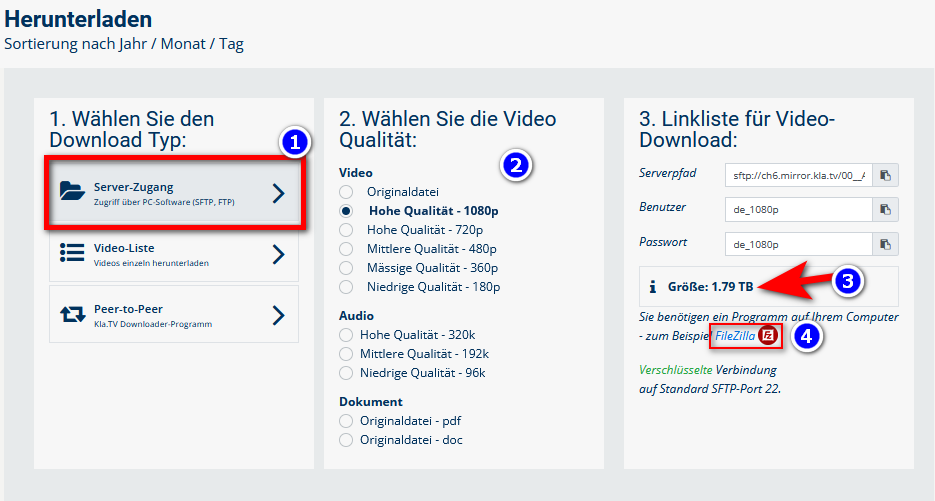
- <span style="background-color: rgb(251, 238, 184);">Shkoni te <span lang="DE" style="font-size: 11pt; line-height: 107%; font-family: 'Cambria Math', serif; color: rgb(7, 40, 230); background-color: rgb(251, 238, 184);">❶</span> **"Qasja në server"** (shih figurën më poshtë)→ dhe zgjidhni <span style="background-color: rgb(251, 238, 184);"><span lang="DE" style="font-size: 11pt; line-height: 107%; font-family: 'Cambria Math', serif; color: rgb(7, 40, 230); background-color: rgb(251, 238, 184);">❷ </span></span>**cilësinë** të dëshiruar.</span>
- <span style="background-color: rgb(251, 238, 184);">Shigjeta <span lang="DE" style="font-size: 11pt; line-height: 107%; font-family: 'Cambria Math', serif; color: rgb(7, 40, 230); background-color: rgb(251, 238, 184);">❸</span> e kuqe ju tregon se sa hapësirë ​​të lirë ju nevojitet në hard diskun tuaj. Rregulloni cilësinë në përputhje me rrethanat.</span>
- <span style="background-color: rgb(251, 238, 184);">Tjetra, do t'ju duhet programi "FileZilla". Për ta bërë këtë, klikoni <span lang="DE" style="font-size: 11pt; line-height: 107%; font-family: 'Cambria Math', serif; color: rgb(7, 40, 230); background-color: rgb(251, 238, 184);">❹</span></span>***<span style="background-color: rgb(251, 238, 184);"><span style="color: rgb(7, 40, 230);"> </span>"FileZilla"</span>  
      
    [![grafik.png](https://wiki.kla.tv/uploads/images/gallery/2024-11/scaled-1680-/IbjQeHpuUJz9G8bE-grafik.png)](https://wiki.kla.tv/uploads/images/gallery/2024-11/IbjQeHpuUJz9G8bE-grafik.png)**

- ***→** <span style="color: rgb(52, 73, 94); background-color: rgb(194, 224, 244);">KËSHILLË:</span><span style="background-color: rgb(251, 238, 184);"> Zgjedhjet e shumëfishta nuk janë të mundshme. Në këtë artikull do të mësoni se si të ruani cilësi të shumta në të njëjtën strukturë dosjeje: klikoni këtu → [<span style="color: rgb(35, 111, 161);">**Shkarkoni cilësi të shumta**</span>](https://wiki.kla.tv/books/ruaj-klatv/page/siguroni-kla-tv-permes-aksesit-ne-server-shkarkoni-cilesi-te-shumta)</span>*

### <span style="background-color: rgb(241, 196, 15);">**2. Instaloni FileZilla-n:**</span>

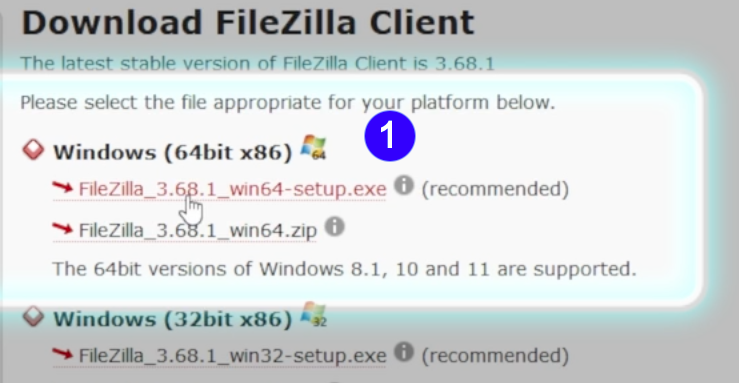
- <span style="background-color: rgb(251, 238, 184);">Zgjidhni <span lang="DE" style="font-size: 11pt; line-height: 107%; font-family: 'Cambria Math', serif; color: rgb(7, 40, 230); background-color: rgb(251, 238, 184);">❶</span> **"Windows (64-bit x86)"** → **Skedari i instalimit** do të shkarkohet automatikisht</span>

[![FileZilla_Win.png](https://wiki.kla.tv/uploads/images/gallery/2024-11/scaled-1680-/caAaduKbfa7Rs1bH-filezilla-win.png)](https://wiki.kla.tv/uploads/images/gallery/2024-11/caAaduKbfa7Rs1bH-filezilla-win.png)

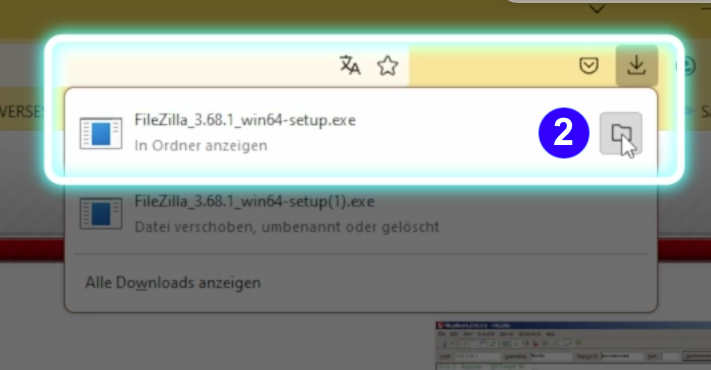
- <span style="background-color: rgb(251, 238, 184);"> <span lang="DE" style="font-size: 11pt; line-height: 107%; font-family: 'Cambria Math', serif; color: rgb(7, 40, 230); background-color: rgb(251, 238, 184);">❷</span></span>**<span style="background-color: rgb(251, 238, 184);"> Klikoni ikonën "Dosje" </span>  
    [![FileZilla_Win12.png](https://wiki.kla.tv/uploads/images/gallery/2024-11/scaled-1680-/NGoMLwwJGP11t1ZK-filezilla-win12.png)](https://wiki.kla.tv/uploads/images/gallery/2024-11/NGoMLwwJGP11t1ZK-filezilla-win12.png)**
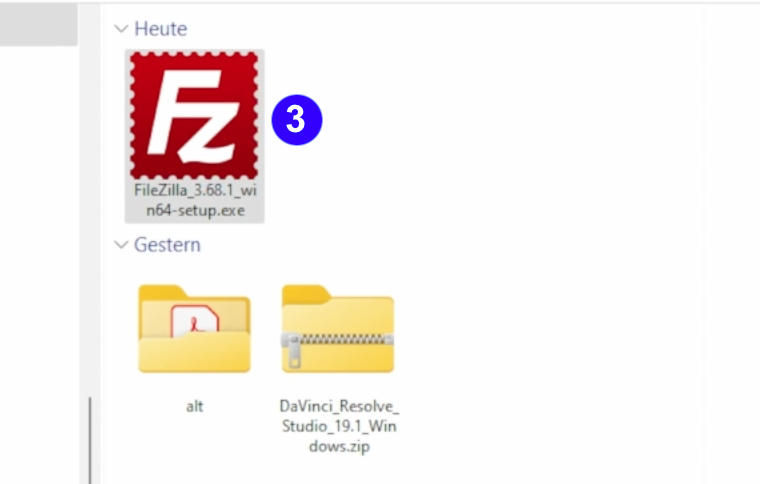
- <span style="background-color: rgb(251, 238, 184);"><span lang="DE" style="font-size: 11pt; line-height: 107%; font-family: 'Cambria Math', serif; color: rgb(7, 40, 230); background-color: rgb(251, 238, 184);">❸</span> Klikoni **dy herë ikonën FileZilla**</span>

 [![FileZilla_Win3.png](https://wiki.kla.tv/uploads/images/gallery/2024-11/scaled-1680-/CshLlTPv0loxG3xy-filezilla-win3.png)](https://wiki.kla.tv/uploads/images/gallery/2024-11/CshLlTPv0loxG3xy-filezilla-win3.png)

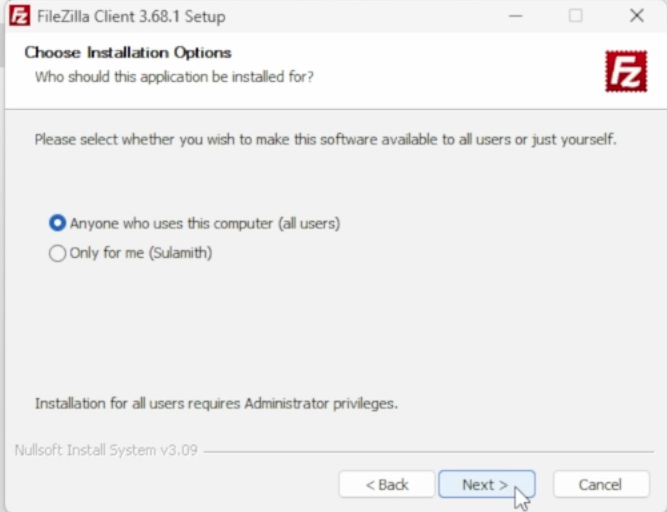
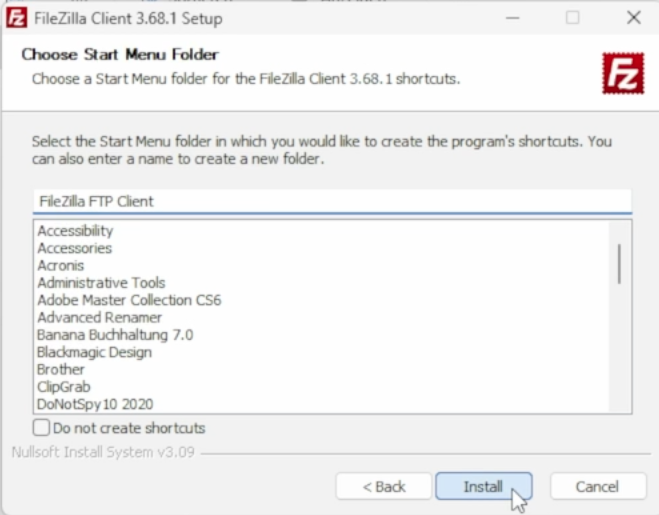
- <span style="background-color: rgb(251, 238, 184);"><span lang="DE" style="font-size: 11pt; line-height: 107%; font-family: 'Cambria Math', serif; background-color: rgb(251, 238, 184);"><span lang="DE" style="font-size: 11pt; line-height: 107%; font-family: 'Cambria Math', serif; color: rgb(7, 40, 230); background-color: rgb(251, 238, 184);">❹</span></span> **Instaloni FileZilla-n (shihni imazhet më poshtë)**</span>

[![FileZilla_Win6.png](https://wiki.kla.tv/uploads/images/gallery/2024-11/scaled-1680-/wfxIztHOgkC68Alr-filezilla-win6.png)](https://wiki.kla.tv/uploads/images/gallery/2024-11/wfxIztHOgkC68Alr-filezilla-win6.png)[ ![FileZilla_Win7.png](https://wiki.kla.tv/uploads/images/gallery/2024-11/scaled-1680-/Jlv1TtbxZYYzBN4L-filezilla-win7.png)](https://wiki.kla.tv/uploads/images/gallery/2024-11/Jlv1TtbxZYYzBN4L-filezilla-win7.png)  
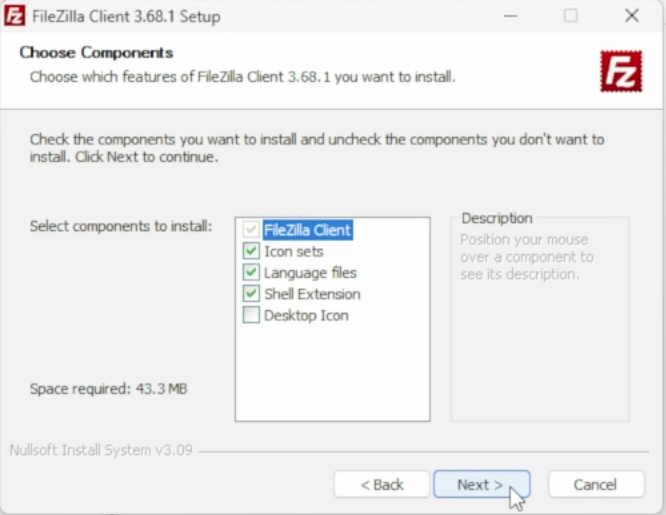
  
[![FileZilla_Win8.png](https://wiki.kla.tv/uploads/images/gallery/2024-11/scaled-1680-/vG7Ud4UODzLQkzzB-filezilla-win8.png) ](https://wiki.kla.tv/uploads/images/gallery/2024-11/vG7Ud4UODzLQkzzB-filezilla-win8.png)[![FileZilla_Win9.png](https://wiki.kla.tv/uploads/images/gallery/2024-11/scaled-1680-/ye0EQINv3v9uYJx8-filezilla-win9.png)](https://wiki.kla.tv/uploads/images/gallery/2024-11/ye0EQINv3v9uYJx8-filezilla-win9.png)
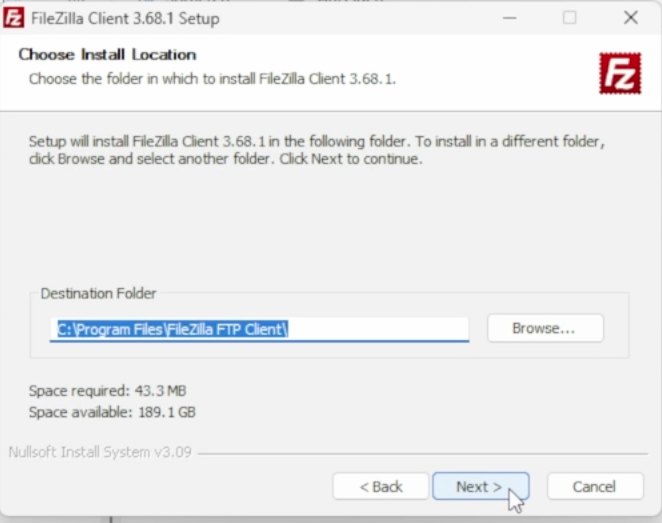
[![FileZilla_Win10.png](https://wiki.kla.tv/uploads/images/gallery/2024-11/scaled-1680-/pOcQNtHKuUS6RHl6-filezilla-win10.png)](https://wiki.kla.tv/uploads/images/gallery/2024-11/pOcQNtHKuUS6RHl6-filezilla-win10.png)
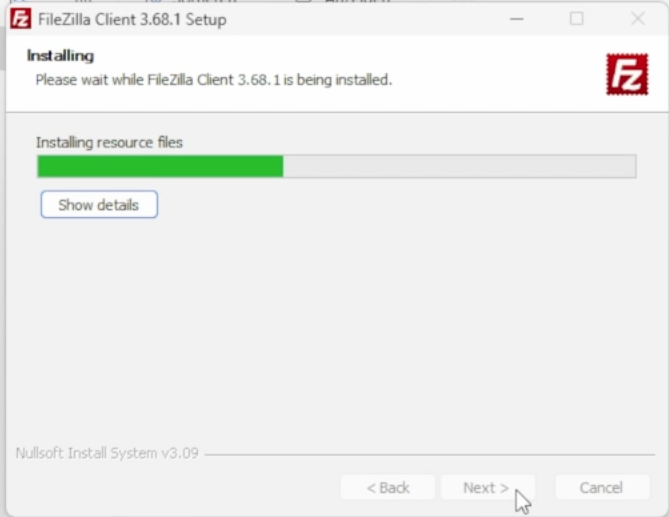
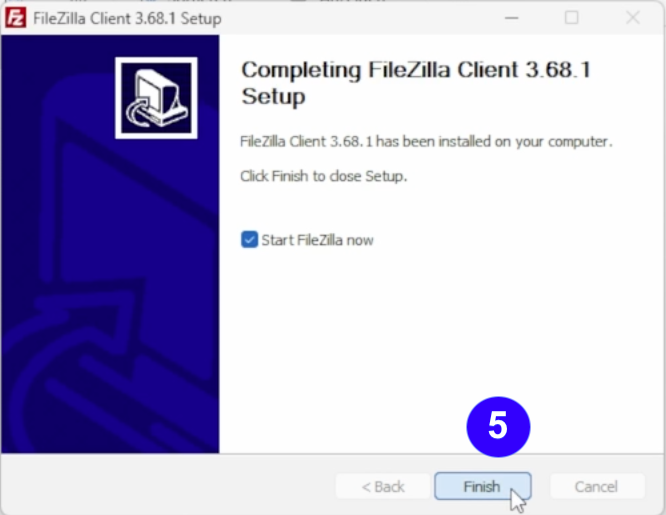
- <span style="background-color: rgb(251, 238, 184);"><span lang="DE" style="font-size: 11pt; line-height: 107%; font-family: 'Cambria Math', serif; color: rgb(7, 40, 230); background-color: rgb(251, 238, 184);">❺</span> **Nisni FileZilla-n** duke klikuar **"Përfundo"**</span>  
    [![FileZilla_Win11.png](https://wiki.kla.tv/uploads/images/gallery/2024-11/scaled-1680-/CiNjxf749VAoxFIr-filezilla-win11.png)](https://wiki.kla.tv/uploads/images/gallery/2024-11/CiNjxf749VAoxFIr-filezilla-win11.png)

### <span style="background-color: rgb(241, 196, 15);">**3. Konfiguroni FileZilla-n:**</span>

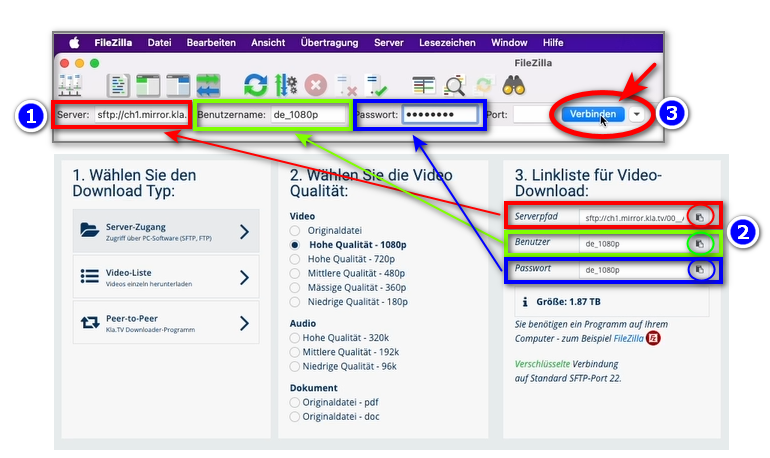
- <span style="background-color: rgb(251, 238, 184);">Kopjoni <span lang="DE" style="font-size: 11pt; line-height: 107%; font-family: 'Cambria Math', serif; color: rgb(7, 40, 230); background-color: rgb(251, 238, 184);">❶</span> **informacionin e serverit** që gjeni në faqen e internetit <span lang="DE" style="font-size: 11pt; line-height: 107%; font-family: 'Cambria Math', serif; color: rgb(7, 40, 230); background-color: rgb(251, 238, 184);">❷</span> **<span style="color: rgb(35, 111, 161);">[www.kla.tv/sichern?lang=sq](https://www.kla.tv/sichern?lang=sq) <span style="color: rgb(0, 0, 0);">-</span> <span style="background-color: rgb(251, 238, 184); color: rgb(52, 73, 94);">të</span></span> treguar në FileZilla → pastaj klikoni** <span lang="DE" style="font-size: 11pt; line-height: 107%; font-family: 'Cambria Math', serif; color: rgb(7, 40, 230); background-color: rgb(251, 238, 184);">❸</span> **"Lidhu":**</span>  
    <span style="background-color: rgb(251, 238, 184);">[(Klikoni në ikonën e rrethuar "Kopjo" <span style="background-color: rgb(251, 238, 184);">![copy icon.png](https://wiki.kla.tv/uploads/images/gallery/2024-11/scaled-1680-/FBgYTFlPc2gfJRTu-copy-icon.png)</span> dhe ngjiteni atë në FileZilla me <span style="background-color: rgb(251, 238, 184);">***ctrl + V***</span>)](https://wiki.kla.tv/uploads/images/gallery/2024-11/FBgYTFlPc2gfJRTu-copy-icon.png) </span>[![grafik.png](https://wiki.kla.tv/uploads/images/gallery/2024-11/scaled-1680-/wbIHEPHXZnCa1P71-grafik.png)](https://wiki.kla.tv/uploads/images/gallery/2024-11/wbIHEPHXZnCa1P71-grafik.png)
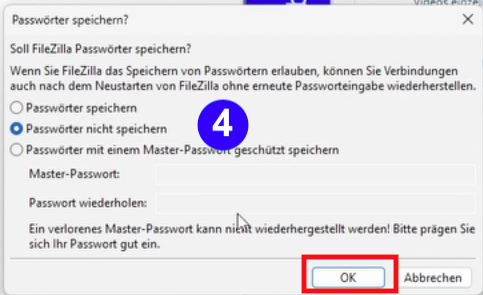
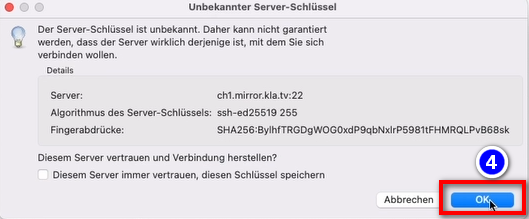
- <span style="background-color: rgb(251, 238, 184);"><span lang="DE" style="font-size: 11pt; line-height: 107%; font-family: 'Cambria Math', serif; color: rgb(7, 40, 230); background-color: rgb(251, 238, 184);">❹</span> Do të shfaqen dy mesazhe. Klikoni **"Mos i ruani fjalëkalimet"** dhe pastaj "OK"</span>  
      
    [![FileZilla-4.png](https://wiki.kla.tv/uploads/images/gallery/2024-11/scaled-1680-/6czE0TcJyOkquJfk-filezilla-4.png)](https://wiki.kla.tv/uploads/images/gallery/2024-11/6czE0TcJyOkquJfk-filezilla-4.png)
    
      
    <span style="background-color: rgb(251, 238, 184);">dhe kur shfaqet mesazhi "Çelësi i serverit të panjohur", klikoni **"Në rregull"**</span>
    
      
    ![grafik.png](https://wiki.kla.tv/uploads/images/gallery/2024-11/scaled-1680-/I4RotrmPs0wSZmSf-grafik.png)

### <span style="background-color: rgb(241, 196, 15);">**4. Ruaj transmetimet:**</span>

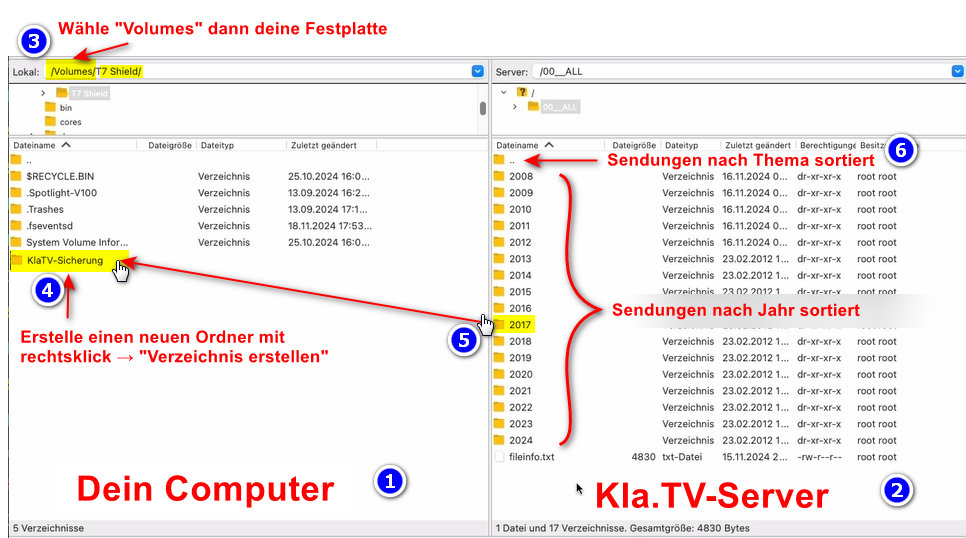
- <span style="background-color: rgb(251, 238, 184);"><span lang="DE" style="font-size: 11pt; line-height: 107%; font-family: 'Cambria Math', serif; color: rgb(7, 40, 230); background-color: rgb(251, 238, 184);">❶</span> Në të majtë, do **të** shihni kompjuterin tuaj, në të djathtë, <span lang="DE" style="font-size: 11pt; line-height: 107%; font-family: 'Cambria Math', serif; color: rgb(7, 40, 230); background-color: rgb(251, 238, 184);">❷</span> serverin **Kla.TV**</span>
- <span style="background-color: rgb(251, 238, 184);">Navigoni te <span style="background-color: rgb(251, 238, 184);"><span lang="DE" style="font-size: 11pt; line-height: 107%; font-family: 'Cambria Math', serif; color: rgb(7, 40, 230); background-color: rgb(251, 238, 184);">❸ </span></span>**hard disku** juaj në të majtë. (Zgjidh Vëllimet në krye dhe pastaj hard disku)</span>
- <span style="background-color: rgb(251, 238, 184);"><span style="background-color: rgb(251, 238, 184);">Krijoni një </span><span lang="DE" style="font-size: 11pt; line-height: 107%; font-family: 'Cambria Math', serif; color: rgb(7, 40, 230); background-color: rgb(251, 238, 184);">❹</span> dosje të re duke klikuar me të djathtën "Krijo Drejtori" → emërtoni dosjen, për shembull, "Ruaj KlaTV".</span>
- <span style="background-color: rgb(251, 238, 184);">Zvarritni <span lang="DE" style="font-size: 11pt; line-height: 107%; font-family: 'Cambria Math', serif; color: rgb(7, 40, 230); background-color: rgb(251, 238, 184);">❺</span> **dosjen e programit të dëshiruar** në hard diskun tuaj ndërsa mbani shtypur butonin e miut</span>
- <span style="background-color: rgb(251, 238, 184);">Gjithashtu mund të shkarkoni një <span lang="DE" style="font-size: 11pt; line-height: 107%; font-family: 'Cambria Math', serif; color: rgb(7, 40, 230); background-color: rgb(251, 238, 184);">❻</span> të **tërë tematike** (p.sh., 5G, vaksinimi, Bill Gates, etj.) Disavantazhi këtu është se videot e reja shtohen vazhdimisht me kalimin e kohës dhe ruhen në dosje të shumta tematike për të njëjtat programe. Do t'ju duhet të sinkronizoheni vazhdimisht me hard diskun tuaj, gjë që kërkon më shumë hapësirë ​​ruajtjeje.</span>
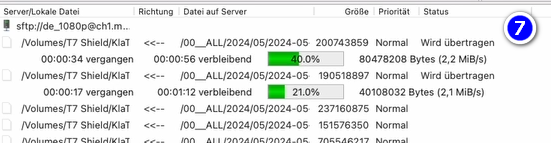
- <span style="background-color: rgb(251, 238, 184);"><span style="color: rgb(7, 40, 230);"><span lang="DE" style="font-size: 11pt; line-height: 107%; font-family: 'Cambria Math', serif; background-color: rgb(251, 238, 184);">❼</span> <span style="color: rgb(52, 73, 94);">Më poshtë mund të shihni se si shkarkohen videot njëra pas tjetrës (kjo mund të zgjasë shumë).</span></span></span>  
      
    <span style="background-color: rgb(251, 238, 184);">*→ <span style="background-color: rgb(194, 224, 244);">**KËSHILLË:** </span>Këtu mund të mësoni se si të kufizoni shpejtësinë e internetit për FileZilla në mënyrë që të mund të punoni ende në internet: klikoni këtu **→ <span style="color: rgb(35, 111, 161);">[Kufizoni shpejtësinë e FileZilla](https://wiki.kla.tv/books/ruaj-klatv/page/siguroni-klatv-nepermjet-aksesit-ne-server-kufizoni-shpejtesine-e-filezilla-s) </span>***</span>[![grafik.png](https://wiki.kla.tv/uploads/images/gallery/2024-11/scaled-1680-/HOYwHxxAZr6RLZ8D-grafik.png)](https://wiki.kla.tv/uploads/images/gallery/2024-11/HOYwHxxAZr6RLZ8D-grafik.png)[![grafik.png](https://wiki.kla.tv/uploads/images/gallery/2024-11/scaled-1680-/uLGmaW3NtFcExaZn-grafik.png)](https://wiki.kla.tv/uploads/images/gallery/2024-11/uLGmaW3NtFcExaZn-grafik.png)
### <span style="background-color: rgb(241, 196, 15);">**5. ALTERNATIVË - Bëni kopje rezervë të programeve pa FileZilla, direkt në faqen e internetit:**</span>

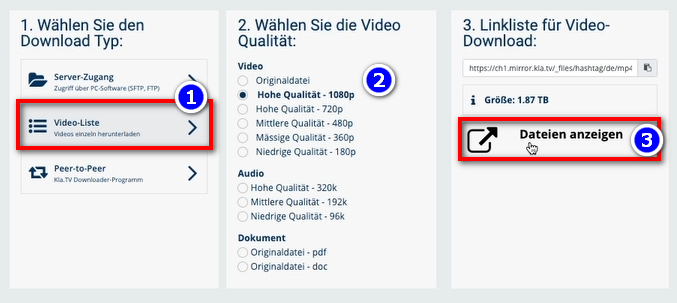
- <span style="background-color: rgb(251, 238, 184);">Shko te [www.kla.tv/sichern?lang=sq](https://www.kla.tv/sichern?lang=sq)→ <span lang="DE" style="font-size: 11pt; line-height: 107%; font-family: 'Cambria Math', serif; color: rgb(7, 40, 230); background-color: rgb(251, 238, 184);">❶</span> **Lista e videove** → zgjidh <span style="background-color: rgb(251, 238, 184);"><span lang="DE" style="font-size: 11pt; line-height: 107%; font-family: 'Cambria Math', serif; color: rgb(7, 40, 230); background-color: rgb(251, 238, 184);">❷ </span></span>**cilësinë** e dëshiruar → kliko <span lang="DE" style="font-size: 11pt; line-height: 107%; font-family: 'Cambria Math', serif; color: rgb(7, 40, 230); background-color: rgb(251, 238, 184);">❸</span> **"Shfaq skedarët"**</span>  
      
    [![grafik.png](https://wiki.kla.tv/uploads/images/gallery/2024-11/scaled-1680-/hwJ3HwIF07YrZFh2-grafik.png)](https://wiki.kla.tv/uploads/images/gallery/2024-11/hwJ3HwIF07YrZFh2-grafik.png)
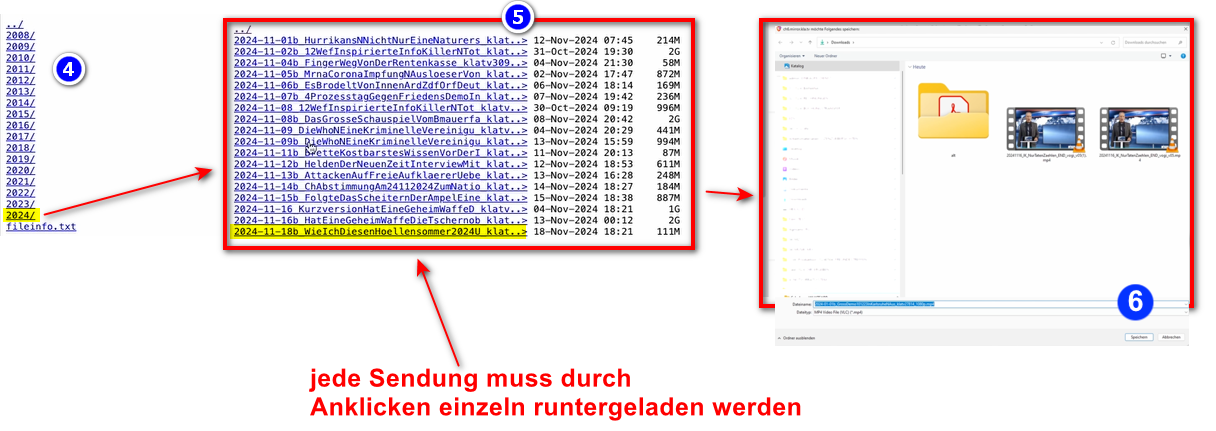
- <span style="background-color: rgb(251, 238, 184);">Tani të gjitha videot <span lang="DE" style="font-size: 11pt; line-height: 107%; font-family: 'Cambria Math', serif; color: rgb(7, 40, 230); background-color: rgb(251, 238, 184);">❹</span> janë të listuara sipas **vitit /** muajit. Klikoni mbi vitin/muajin e dëshiruar dhe klikoni mbi transmetin</span>  
    <span style="background-color: rgb(251, 238, 184);"><span lang="DE" style="font-size: 11pt; line-height: 107%; font-family: 'Cambria Math', serif; color: rgb(7, 40, 230); background-color: rgb(251, 238, 184);">❺</span> **dhe shtypni** <span lang="DE" style="font-size: 11pt; line-height: 107%; font-family: 'Cambria Math', serif; color: rgb(7, 40, 230); background-color: rgb(251, 238, 184);">❻</span> "**Ruaj**". Çdo transmetin individual duhet të shkarkohet individualisht.</span>  
      
      
    [![oZKkaxeiI86s51EM-grafik_WIN.png](https://wiki.kla.tv/uploads/images/gallery/2024-11/scaled-1680-/rCzaPyrQsLLn8O0N-ozkkaxeii86s51em-grafik-win.png)](https://wiki.kla.tv/uploads/images/gallery/2024-11/rCzaPyrQsLLn8O0N-ozkkaxeii86s51em-grafik-win.png)  
      
    *→ <span style="background-color: rgb(194, 224, 244);">**KËSHILLË:<span style="background-color: rgb(251, 238, 184);"> </span>**</span>*<span style="background-color: rgb(194, 224, 244);"><span style="background-color: rgb(251, 238, 184);">Kjo është shumë komplekse dhe kërkon shumë kohë. Prandaj, rekomandohet varianti FileZilla</span></span>  
      
    ### <span style="background-color: rgb(241, 196, 15);">**6. Rekomandim: Vendosni opsionet e energjisë në mënyrë që kompjuteri të mos fiket automatikisht:** </span>
    
    
    - <span style="background-color: rgb(251, 238, 184);">Nëse kompjuteri riniset, do t'ju duhet të rinisni aplikacionin (shihni udhëzimet në pikën 8)</span>
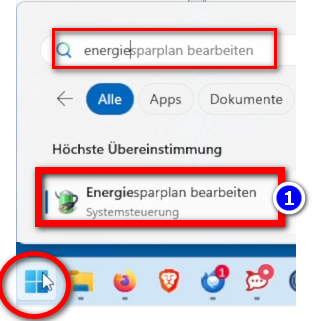
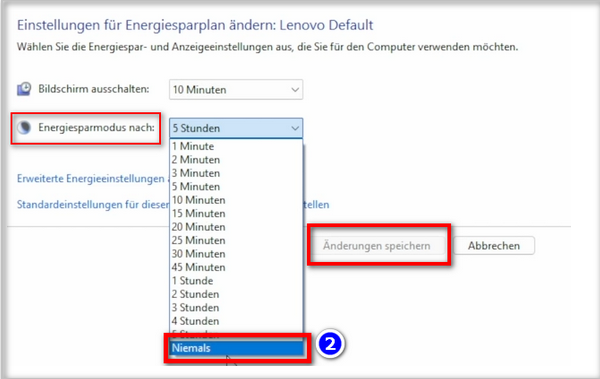
    - <span style="background-color: rgb(251, 238, 184);">Ndryshoni opsionet e energjisë në mënyrë që kompjuteri të mos fiket: **Ikona e Windows**→ **Fusha e kërkimit:** **Plani i energjisë** → <span lang="DE" style="font-size: 16pt; line-height: 107%; font-family: Wingdings; background-color: rgb(251, 238, 184);"><span style="mso-char-type: symbol; mso-symbol-font-family: Wingdings;"><span lang="EN-US" style="font-size: 11pt; line-height: 107%; font-family: 'Cambria Math', serif; background-color: rgb(251, 238, 184);">❶</span></span></span> **Modifiko planin e energjisë →** <span lang="DE" style="font-size: 16pt; line-height: 107%; font-family: Wingdings; background-color: rgb(251, 238, 184);"><span style="mso-char-type: symbol; mso-symbol-font-family: Wingdings;"><span lang="EN-US" style="font-size: 11pt; line-height: 107%; font-family: 'Cambria Math', serif; background-color: rgb(251, 238, 184);">❷</span></span></span> **Modaliteti i kursimit të energjisë pas: Asnjëherë → Ruaj ndryshimet**</span>
    - <span style="background-color: rgb(251, 238, 184);">Lëreni kompjuterin të funksionojë derisa të jenë shkarkuar të gjithë skedarët</span>
    
    ![grafik.png](https://wiki.kla.tv/uploads/images/gallery/2024-11/scaled-1680-/ONpMkNkqaQmKdYtX-grafik.png)  
      
    ![grafik.png](https://wiki.kla.tv/uploads/images/gallery/2024-11/scaled-1680-/c6InTIccNIpkCbYb-grafik.png)

<p class="callout info">Ne gjithashtu rekomandojmë kurset e mëposhtme të trajnimit:  
  
**[Përcaktimi i hapësirës së ruajtjes - Si mund ta gjej se sa hapësirë ​​ruajtjeje më duhet për dosje specifike?](https://wiki.kla.tv/books/ruaj-klatv/page/sigurojeni-klatv-permes-aksesit-ne-server-percaktoni-hapesiren-e-ruajtjes)  
  
[Si mund ta kufizoj shpejtësinë e FileZilla?](https://wiki.kla.tv/books/ruaj-klatv/page/siguroni-klatv-nepermjet-aksesit-ne-server-kufizoni-shpejtesine-e-filezilla-s)  
  
[Si mund të shkarkoj cilësi të shumta?](https://wiki.kla.tv/books/ruaj-klatv/page/siguroni-kla-tv-permes-aksesit-ne-server-shkarkoni-cilesi-te-shumta)  
  
[Si mund të kërkoj në arkivin tim të ruajtur?](https://wiki.kla.tv/books/ruaj-klatv/page/siguroni-klatv-permes-aksesit-ne-server-kerkoni-arkivin-e-siguruar)**  
</p>