# MAC: ምትካልን ኣጠቓቕማን ናይ “Kla.TV Downloader”።

### **ኣብዛ ዓንቀጽ እዚኣ እንታይ ክትመሃር ኢኻ፧**

ኣብ ማክና ከመይ ጌርና Kla.TV downloader ንጽዕኖ ክትመሃሩ ኢኹም። እቲ Kla.TV downloader ንማህደርካ ብኣውቶማቲክ የዘምኖ። ማዕረ ማዕሪኡ ድማ እቲ ምጽዓን ብመንገዲ ቪድዮ ምትእስሳርካ ንኻልኦት ተጠቀምቲ ክቐርብ ክትገብሮ ትኽእል ኢኻ። ንኺድ፤

### **ትምህርቲ ቪድዮ፦ (13 ደቒቕ)**

<iframe allowfullscreen="allowfullscreen" frameborder="0" height="332" src="https://www.kla.tv/index.php?a=showembed&vidid=31128&lang=de" width="590"></iframe>

<div class="responsive-iframe" id="bkmrk--1"></div><p class="callout warning">ነቲ ዝተጻሕፈ መምርሒታት ብዝበለጸ ንምርዳእ መጀመርታ ነታ ቪድዮ ክትከታተሉ ንመክር።</p>

### <span lang="DE" style="font-size: 16.0pt; mso-bidi-font-size: 11.0pt; line-height: 107%; font-family: Wingdings; mso-ascii-font-family: Calibri; mso-ascii-theme-font: minor-latin; mso-fareast-font-family: Calibri; mso-fareast-theme-font: minor-latin; mso-hansi-font-family: Calibri; mso-hansi-theme-font: minor-latin; mso-bidi-font-family: 'Times New Roman'; mso-bidi-theme-font: minor-bidi; mso-ansi-language: DE; mso-fareast-language: EN-US; mso-bidi-language: AR-SA; mso-char-type: symbol; mso-symbol-font-family: Wingdings;"><span style="mso-char-type: symbol; mso-symbol-font-family: Wingdings;">&#131;</span></span><span lang="DE" style="font-size: 16.0pt; mso-bidi-font-size: 11.0pt; line-height: 107%; font-family: Wingdings; mso-ascii-font-family: Calibri; mso-ascii-theme-font: minor-latin; mso-fareast-font-family: Calibri; mso-fareast-theme-font: minor-latin; mso-hansi-font-family: Calibri; mso-hansi-theme-font: minor-latin; mso-bidi-font-family: 'Times New Roman'; mso-bidi-theme-font: minor-bidi; mso-ansi-language: DE; mso-fareast-language: EN-US; mso-bidi-language: AR-SA; mso-char-type: symbol; mso-symbol-font-family: Wingdings;"><span style="mso-char-type: symbol; mso-symbol-font-family: Wingdings;">&#132;</span></span><span lang="DE" style="font-size: 16.0pt; mso-bidi-font-size: 11.0pt; line-height: 107%; font-family: Wingdings; mso-ascii-font-family: Calibri; mso-ascii-theme-font: minor-latin; mso-fareast-font-family: Calibri; mso-fareast-theme-font: minor-latin; mso-hansi-font-family: Calibri; mso-hansi-theme-font: minor-latin; mso-bidi-font-family: 'Times New Roman'; mso-bidi-theme-font: minor-bidi; mso-ansi-language: DE; mso-fareast-language: EN-US; mso-bidi-language: AR-SA; mso-char-type: symbol; mso-symbol-font-family: Wingdings;"><span style="mso-char-type: symbol; mso-symbol-font-family: Wingdings;"> </span></span>**ብጽሑፍ ዝተዋህበ መምርሒ፤**

### <span style="background-color: rgb(241, 196, 15);">**1. መሰረታዊ ነገራት፤**</span>

- ኣብ መንጎ Kla.TV downloaderን download ምስ server access (ብመንገዲ FileZilla) እንታይ ፍልልይ ኣሎ?  
    
    - ነቲ ማህደር ብሓንሳብ ብፋይለዚላ ብመንገዲ ሰርቨር ኣክሰስ ትወርዶ እሞ ድሕሪኡ “ብኢድካ” ከተመሓይሾን እዋናዊ ፈነወታት ከተውርዶን ኣለካ
    - ብናይ ዳውንሎደር ፕሮግራም ብኣውቶማቲክ ንማህደርካ ከተመሓይሾን ምስቲ ናይ ሰርቨር ዳታ ከተመዓራርዮን ትኽእል። ሓንሳብ ምስ ኣቐመጥካዮ ብኣውቶማቲክ ክመሓየሽ እዩ። ካብ ቪድዮ ምትእስሳርካ ቪድዮታት ካልኦት ተጠቀምቲ ንኽሰቕልዎ እውን ክትገብር ትኽእል ኢኻ።
- ነዚ ንምግባር ክልተ ፕሮግራማት ዳግማይ ክትተክል ኣለካ። 1. እቲ Kla.TV Downloader ከምኡውን 2. እቲ qBittorrent. መምርሒታት ኣብዚ ኣሎ፤

### <span style="background-color: rgb(241, 196, 15);">**2. Kla.TV ዝብል ዳውንሎደር ምጽዓን፤**</span>

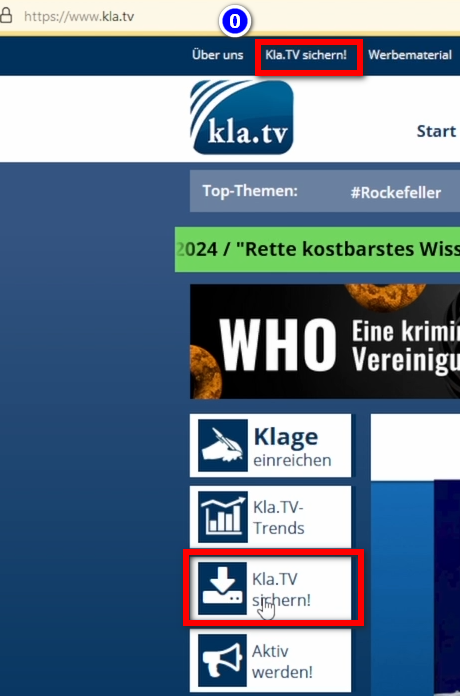
- <span style="background-color: rgb(251, 238, 184);">ናብ ገጽ </span>**<span style="background-color: rgb(251, 238, 184);">[kla.tv/sichern](https://www.kla.tv/sichern)</span> <span style="background-color: rgb(52, 73, 94); color: rgb(236, 240, 241);">(0)</span>   
      
    [![grafik.png](https://wiki.kla.tv/uploads/images/gallery/2024-11/scaled-1680-/Dv7hI2hEiWQk8ey8-grafik.png)](https://wiki.kla.tv/uploads/images/gallery/2024-11/Dv7hI2hEiWQk8ey8-grafik.png)**<span style="background-color: rgb(251, 238, 184);">  
      
    </span>
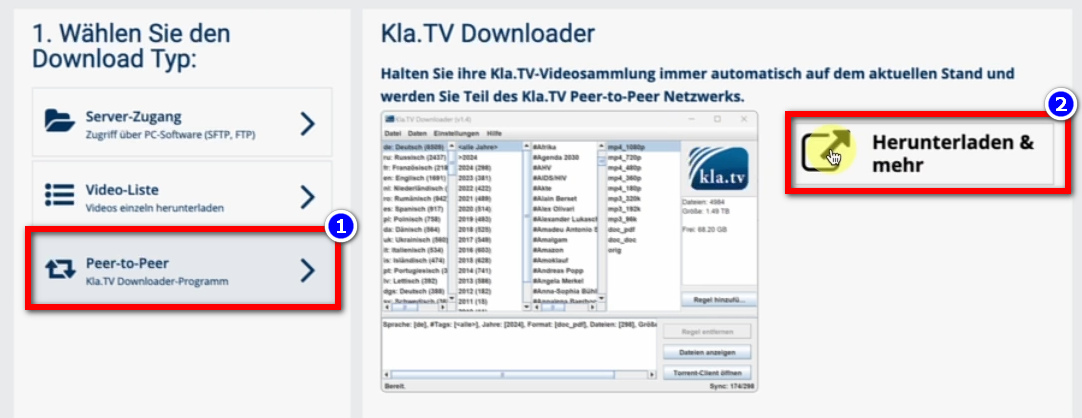
- <span style="background-color: rgb(251, 238, 184);">ናብ Download Type ❶ “Peer-to-Peer” → ❷ “Download &amp; more” ኪድ።</span>  
      
    [![grafik.png](https://wiki.kla.tv/uploads/images/gallery/2024-11/scaled-1680-/nuXM0H06k643OGNZ-grafik.png)](https://wiki.kla.tv/uploads/images/gallery/2024-11/nuXM0H06k643OGNZ-grafik.png)
- <span style="background-color: rgb(251, 238, 184);">❸ Kla-TV-Downloader → “Assets” → ❹ “Kla.TV.Downloader-\*.\*\*msi” ብምጥዋቕ ናይ ሕጂ መደብ (ኩሉ ግዜ ኣብ ላዕሊ) ኣውርድዎ።</span>  
      
    [![grafik.png](https://wiki.kla.tv/uploads/images/gallery/2024-11/scaled-1680-/ZHJIXNQOHy6dYlte-grafik.png)](https://wiki.kla.tv/uploads/images/gallery/2024-11/ZHJIXNQOHy6dYlte-grafik.png)
    
    [![grafik.png](https://wiki.kla.tv/uploads/images/gallery/2024-11/scaled-1680-/xKO8pwvIyzzKFFa6-grafik.png)](https://wiki.kla.tv/uploads/images/gallery/2024-11/xKO8pwvIyzzKFFa6-grafik.png)
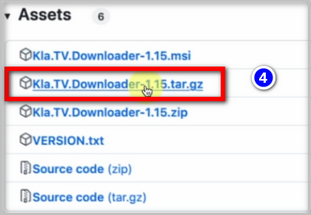
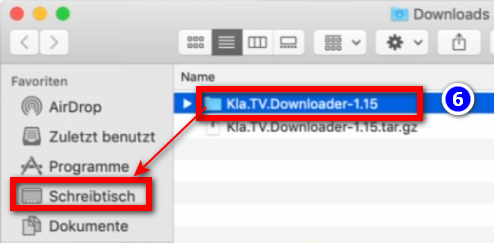
- <span style="background-color: rgb(251, 238, 184);"><span lang="DE" style="font-size: 16pt; line-height: 107%; font-family: Wingdings; background-color: rgb(251, 238, 184);"><span style="mso-char-type: symbol; mso-symbol-font-family: Wingdings;"><span lang="EN-US" style="font-size: 11pt; line-height: 107%; font-family: 'Cambria Math', serif; background-color: rgb(251, 238, 184);">❺ ነቲ ፕሮግራም ከፊትካ ምፍታሕ → ንኣብነት። ናብ ❻ ዴስክቶፕ</span></span></span></span>  
      
    ![grafik.png](https://wiki.kla.tv/uploads/images/gallery/2024-11/scaled-1680-/fqkvJohFv6e5fZeD-grafik.png)[![grafik.png](https://wiki.kla.tv/uploads/images/gallery/2024-11/scaled-1680-/fgT1bYzgnnG9BTgh-grafik.png)](https://wiki.kla.tv/uploads/images/gallery/2024-11/fgT1bYzgnnG9BTgh-grafik.png)

<span lang="DE" style="font-size: 16.0pt; mso-bidi-font-size: 11.0pt; line-height: 107%; font-family: Wingdings; mso-ascii-font-family: Calibri; mso-ascii-theme-font: minor-latin; mso-fareast-font-family: Calibri; mso-fareast-theme-font: minor-latin; mso-hansi-font-family: Calibri; mso-hansi-theme-font: minor-latin; mso-bidi-font-family: 'Times New Roman'; mso-bidi-theme-font: minor-bidi; mso-ansi-language: DE; mso-fareast-language: EN-US; mso-bidi-language: AR-SA; mso-char-type: symbol; mso-symbol-font-family: Wingdings;"><span style="mso-char-type: symbol; mso-symbol-font-family: Wingdings;">  
</span></span>

### <span style="background-color: rgb(241, 196, 15);">**3. ጃቫ ምትካል (እቲ Kla.TV downloader ንኽሰርሕ)፤**</span>

- <span style="background-color: rgb(251, 238, 184);">ናብ <span style="background-color: rgb(251, 238, 184);"> [**adoptium.net/**](https://adoptium.net/)</span> ኪዱ።</span>
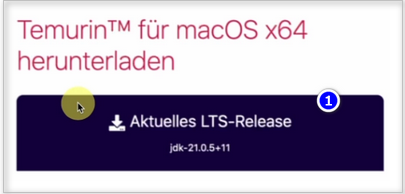
- <span style="background-color: rgb(251, 238, 184);">ቅኑዕ ፕሮግራም ❶ “Current LTS version” ንማክና ኣብዚ ይርአ። ንምውራድ ኣብዚ ጠውቑ።</span>  
      
    [![grafik.png](https://wiki.kla.tv/uploads/images/gallery/2024-11/scaled-1680-/EmWazYFln77srf5R-grafik.png)](https://wiki.kla.tv/uploads/images/gallery/2024-11/EmWazYFln77srf5R-grafik.png)
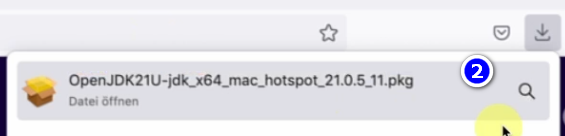
- <span style="background-color: rgb(251, 238, 184);"><span lang="DE" style="font-size: 16pt; line-height: 107%; font-family: Wingdings; background-color: rgb(251, 238, 184);"><span style="mso-char-type: symbol; mso-symbol-font-family: Wingdings;"><span lang="EN-US" style="font-size: 11pt; line-height: 107%; font-family: 'Cambria Math', serif; background-color: rgb(251, 238, 184);">❷ ድርብ ጠውቕ → ቀጺልና → ተቐበል → ቀጺልና → ምትካል (ናይ ማክ ተጠቃሚ ስምን ፓስዎርድን ኣእቱ) → ሶፍትዌር ምትካል → ምዕጻው → ናብ ጓሓፍ (ናይ ምትካል ፋይል) ብምኻድ ነቲ ፕሮግራም ንጽዓኖ</span></span></span></span>  
      
    [![grafik.png](https://wiki.kla.tv/uploads/images/gallery/2024-11/scaled-1680-/H7DQOnAAE3ZeBUmo-grafik.png)](https://wiki.kla.tv/uploads/images/gallery/2024-11/H7DQOnAAE3ZeBUmo-grafik.png)

### <span style="background-color: rgb(241, 196, 15);">**4. ናይ ጸጥታ ቅጥዕታትን ዳውንሎደርን ምድላው።**</span>

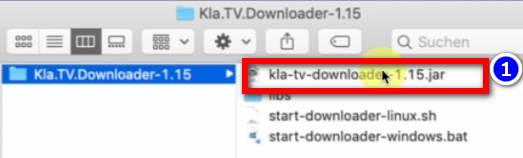
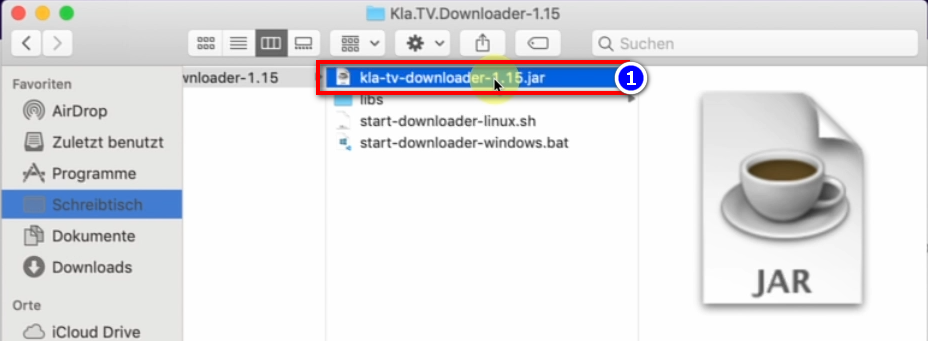
- <span style="background-color: rgb(251, 238, 184);">ኣብ ዴስክቶፕና ናብቲ Kla.TV-Downloader ዝብል ፎልደር ብምኻድ ❶ kla-tv-downloader-.jar ንኽፈት</span>  
     ![grafik.png](https://wiki.kla.tv/uploads/images/gallery/2024-11/scaled-1680-/xmXsOy2llxi8ItL3-grafik.png)
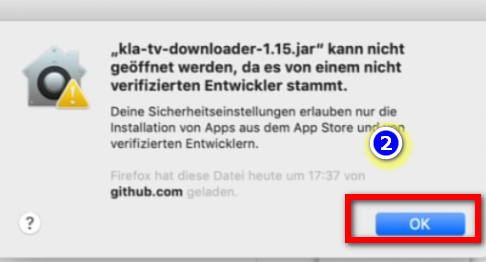
- **ኣብቲ ❷ ናይ መጠንቀቕታ መልእኽቲ "OK" ዝብል ጠውቕ**  
    [![grafik.png](https://wiki.kla.tv/uploads/images/gallery/2024-11/scaled-1680-/ctWjfFgcE6oNtDZi-grafik.png)](https://wiki.kla.tv/uploads/images/gallery/2024-11/ctWjfFgcE6oNtDZi-grafik.png)
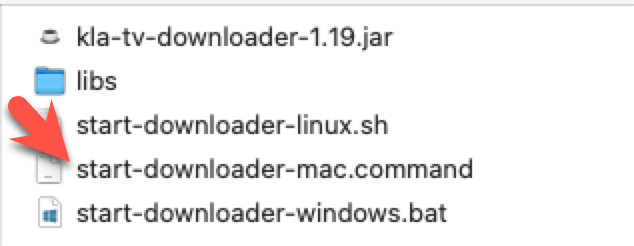
<p class="callout warning">ናይ ቀደም ስሪት ማክ፡ ንኣብነት። ኣብ ትሕቲ Mac OS 10.7 ድርብ ጠውቂ ብምግባር JAR ፋይል ምኽፋት ኣይከኣልን እዩ። ነዚ ንምግባር ድማ ኣብቲ ፎልደር ዝርከብ “start-downloader-mac.command” ዝብል ፋይል ጀምር። ፋይል ኣይተረኽበን? ድሕሪኡ እታ ዝሓሸት ስሪት ኣውሪድካ እንደገና ፍታሕ፡ https://github.com/Kla-TV/downloader/releases/። [https://github.com/Kla-TV/downloader/releases/](https://github.com/Kla-TV/downloader/releases/). (ፋይል ሰንበት 23 ሕዳር ሰዓት 3፡12 ድሕሪ ቀትሪ ተወሰኸ)</p>

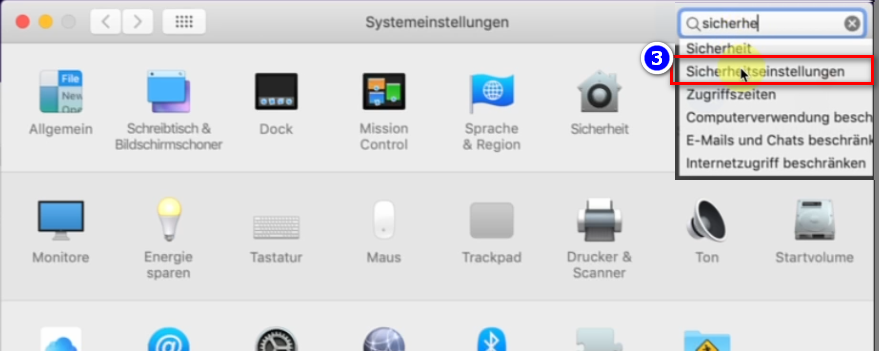
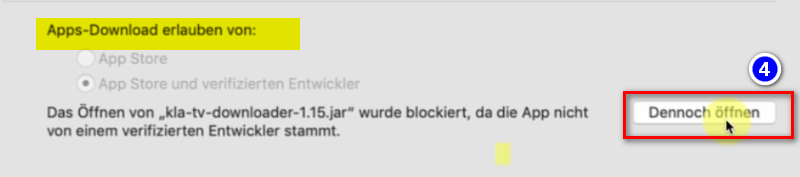
- <span style="background-color: rgb(251, 238, 184);">ናይ Mac's System Preferences ክፈት → ❸ "Security &amp; Privacy" ጽሓፍ (ኣብ ሓደስቲ Macs ናብ: Privacy and Security ንኺድ) → ኣብ ትሕቲ "Allow apps to download from" ❹ "Open anyway" → ❺ Open ዝብል ጠውቕ</span> **[![grafik.png](https://wiki.kla.tv/uploads/images/gallery/2024-11/scaled-1680-/4QHcwAGwlXxVJpfH-grafik.png)](https://wiki.kla.tv/uploads/images/gallery/2024-11/4QHcwAGwlXxVJpfH-grafik.png)[![grafik.png](https://wiki.kla.tv/uploads/images/gallery/2024-11/scaled-1680-/7PJo5iZ9CpX9xGP4-grafik.png)](https://wiki.kla.tv/uploads/images/gallery/2024-11/7PJo5iZ9CpX9xGP4-grafik.png)[![grafik.png](https://wiki.kla.tv/uploads/images/gallery/2024-11/scaled-1680-/8DkrZiRyz2KlOO2K-grafik.png)](https://wiki.kla.tv/uploads/images/gallery/2024-11/8DkrZiRyz2KlOO2K-grafik.png)**
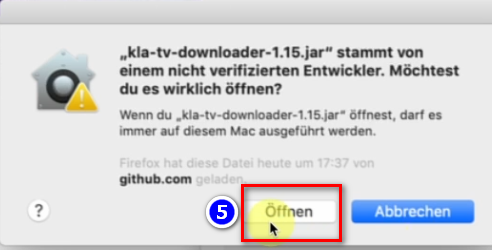
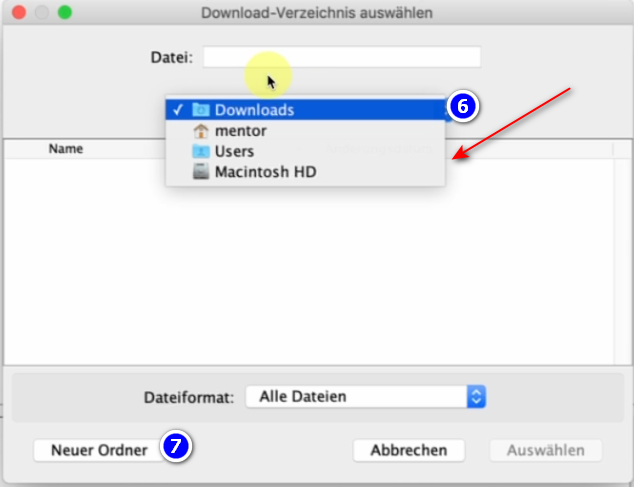
- <span style="background-color: rgb(251, 238, 184);">ኣብቲ ዝተኸፍተ ፕሮግራም፡ እቶም ዝወረዱ ፋይላት ኣበይ ከም እንዕቅቦም ምረጽ ❻ (ናይ ደገ ሃርድ ድራይቭ እንተተጠቒምና ይምረጽ) → “KlaTV Backup” ዝበሃል ሓድሽ ፎልደር ንፈጥር ❼ እሞ ነዚ ፎልደር ምረጽ</span>  
      
    [![grafik.png](https://wiki.kla.tv/uploads/images/gallery/2024-11/scaled-1680-/2gnwZlKS1YbJ22AJ-grafik.png)](https://wiki.kla.tv/uploads/images/gallery/2024-11/2gnwZlKS1YbJ22AJ-grafik.png)
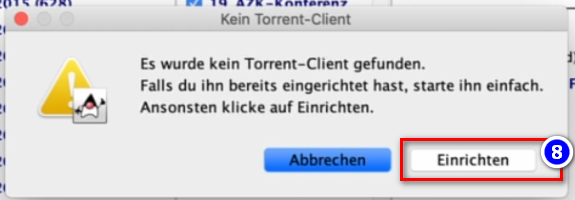
- <span style="background-color: rgb(251, 238, 184);">ዝኾነ ናይ ቶረንት ዓሚል ከምዘየለ ዝገልጽ መልእኽቲ ይመጽእ (ምኽንያቱ qBittorrent ጌና ስለዘድሊ) → ኣብ ❽ Set up ጠውቕ</span>  
      
    [![grafik.png](https://wiki.kla.tv/uploads/images/gallery/2024-11/scaled-1680-/zhpiLXdRyXCGj3Pj-grafik.png)](https://wiki.kla.tv/uploads/images/gallery/2024-11/zhpiLXdRyXCGj3Pj-grafik.png)

### <span style="background-color: rgb(241, 196, 15);">**5. qBittorrent ምድላው።**</span>

- <span style="background-color: rgb(251, 238, 184);">ኣብ ላዕሊ ኣብ ዘሎ ደረጃ 8 “Set Up” ምስ ጠወቕካ፡ ሓደ ዌብሳይት ይኽፈት። ገጽ ክፉት ግደፎ</span>
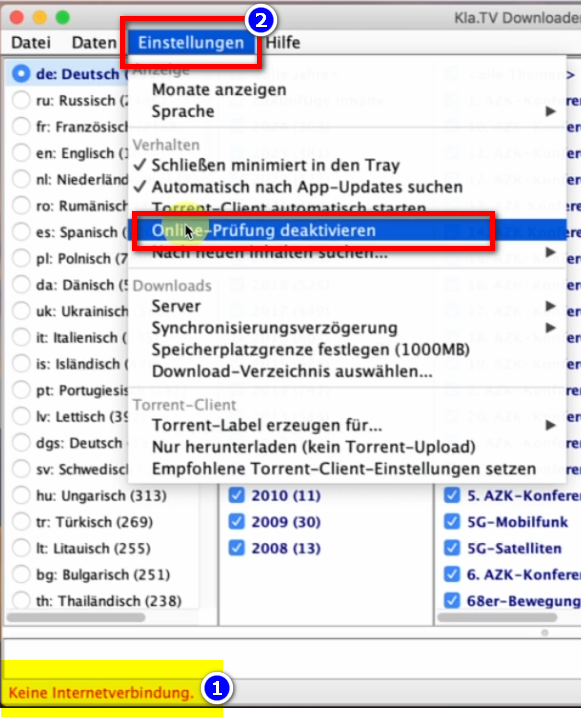
- <span style="background-color: rgb(251, 238, 184);">ናብ ፕሮግራም KlaTV Downloader ቀይርኩም ኣብ ታሕቲ ቀይሕ እንተኾይኑ: ❶ "no internet connection", ድሕሪኡ ናብ → Settings → Deactivate online check-in ❷ Menu bar ንኺድ</span> **[![grafik.png](https://wiki.kla.tv/uploads/images/gallery/2024-11/scaled-1680-/lBx9ws8cG2ode0kv-grafik.png)](https://wiki.kla.tv/uploads/images/gallery/2024-11/lBx9ws8cG2ode0kv-grafik.png)**
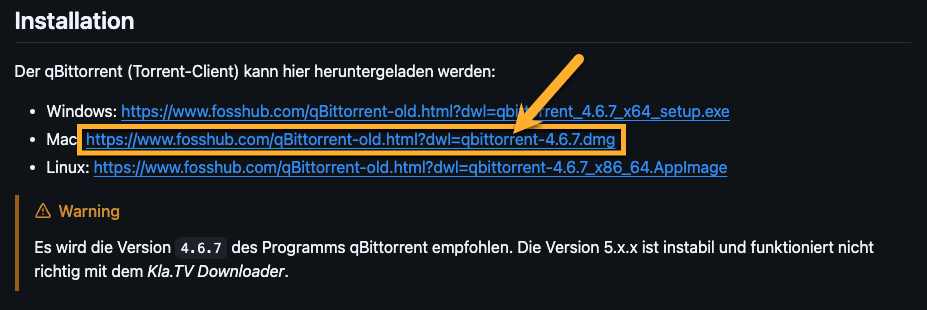
- <span style="background-color: rgb(251, 238, 184);">ናብ መርበብ ሓበሬታ (Torrent Client...) ተመሊስና ናብ "Installation" ንኺድ → ነቲ ❸ ዝብል ፕሮግራም ምውራድ ምረጽ</span>**<span style="background-color: rgb(251, 238, 184);">  
      
    [https://github.com/Kla-TV/downloader/wiki/Torrent%E2%80%90Client-manuell-einrichten#installation](https://github.com/Kla-TV/downloader/wiki/Torrent%E2%80%90Client-manuell-einrichten#installation) </span>** [![image.png](https://wiki.kla.tv/uploads/images/gallery/2024-12/scaled-1680-/Xlt4zxUN0Vaj36Lb-image.png)](https://wiki.kla.tv/uploads/images/gallery/2024-12/Xlt4zxUN0Vaj36Lb-image.png)
- <span style="background-color: rgb(251, 238, 184);">ኣብቲ ናይ ማክ ሊንክ እንተ ጠዊቕካ፡ እቲ ምውራድ ብኣውቶማቲክ ክጅምር እዩ።</span>
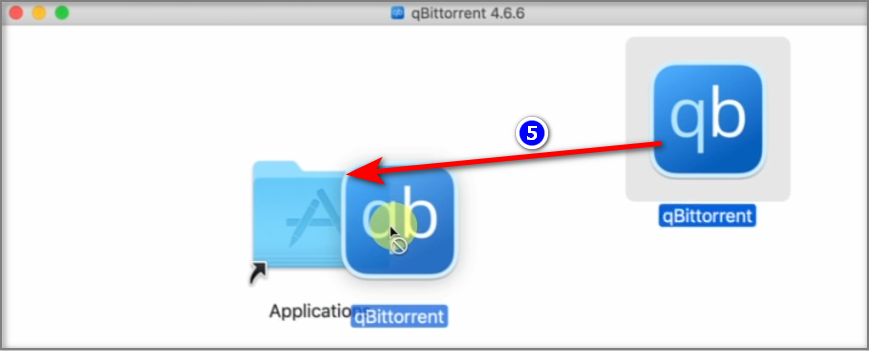
- <span style="background-color: rgb(251, 238, 184);">መስኮት ምትካል ይኽፈት። ነቲ ፕሮግራም ❺ ናብ ኣፕሊኬሽናት → ምርግጋጽ (Insert Mac Password) ስሓቦ።  
    </span>  
    [![grafik.png](https://wiki.kla.tv/uploads/images/gallery/2024-11/scaled-1680-/OtnZFeOV0e12B3va-grafik.png)](https://wiki.kla.tv/uploads/images/gallery/2024-11/OtnZFeOV0e12B3va-grafik.png)
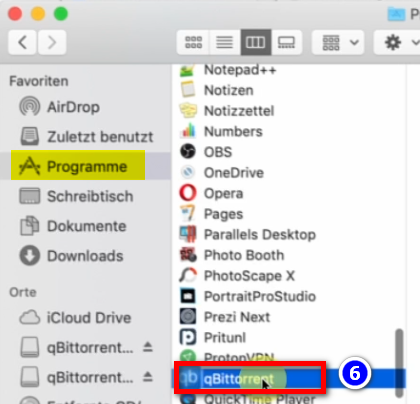
- <span style="background-color: rgb(251, 238, 184);">ናብ ቅጥዕታትካ ብምኻድ ❻ "qBittorrent" ክፈት።</span>  
      
    ![grafik.png](https://wiki.kla.tv/uploads/images/gallery/2024-11/scaled-1680-/R6s026HMTWcaSmzq-grafik.png)
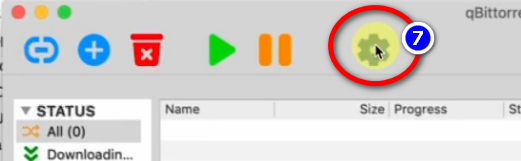
- <span style="background-color: rgb(251, 238, 184);">ኣብቲ "qBittorent" ዝብል ፕሮግራም ናብ ❼ settings wheel ንኺድ</span> **[![grafik.png](https://wiki.kla.tv/uploads/images/gallery/2024-11/scaled-1680-/JZfeWVhWlOmQeUQm-grafik.png)](https://wiki.kla.tv/uploads/images/gallery/2024-11/JZfeWVhWlOmQeUQm-grafik.png)**
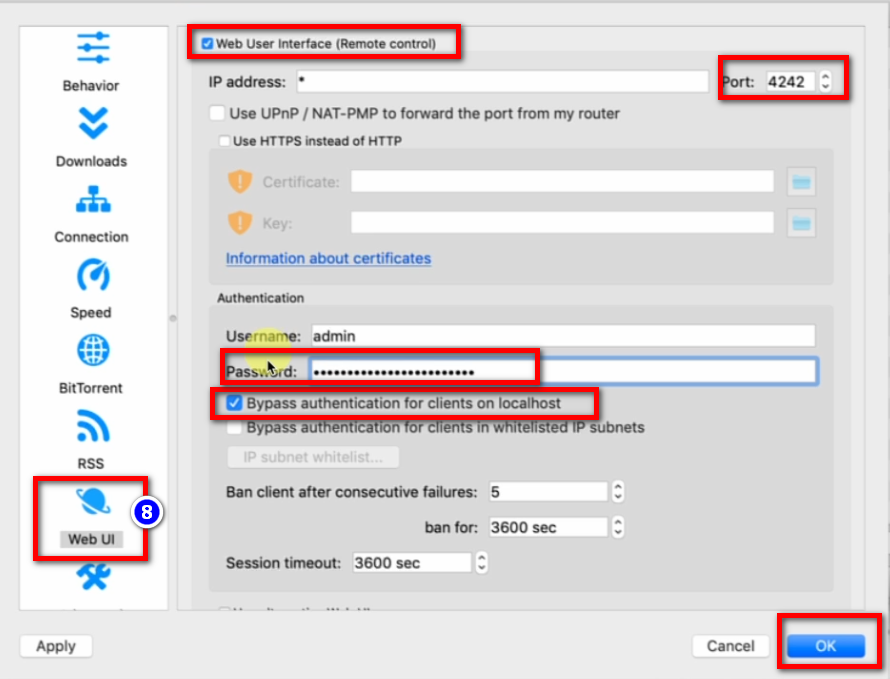
- <span style="background-color: rgb(251, 238, 184);"><span lang="DE" style="font-size: 16pt; line-height: 107%; font-family: Wingdings; background-color: rgb(251, 238, 184);"><span style="mso-char-type: symbol; mso-symbol-font-family: Wingdings;"><span lang="EN-US" style="font-size: 11pt; line-height: 107%; font-family: 'Cambria Math', serif; background-color: rgb(251, 238, 184);">❽→ Web UI → enable: “Web User Interface” → Port: 4242 → enable “Bypass authentication for clients on localhost” → ምልክት ቃል: ገለ ነገር ኣእቱ፣ ምዝካር ኣየድልየካን’ዩ።</span></span></span></span>  
      
    [![grafik.png](https://wiki.kla.tv/uploads/images/gallery/2024-11/scaled-1680-/Q9GO0locW3FdJvQ2-grafik.png)](https://wiki.kla.tv/uploads/images/gallery/2024-11/Q9GO0locW3FdJvQ2-grafik.png)
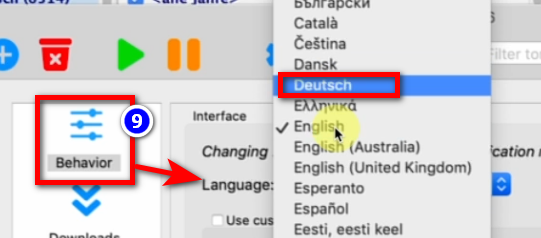
- <span style="background-color: rgb(251, 238, 184);"><span lang="DE" style="font-size: 16pt; line-height: 107%; font-family: Wingdings; background-color: rgb(251, 238, 184);"><span style="mso-char-type: symbol; mso-symbol-font-family: Wingdings;"><span lang="EN-US" style="font-size: 11pt; line-height: 107%; font-family: 'Cambria Math', serif; background-color: rgb(251, 238, 184);">❾→ ተግባር → ቋንቋ፡ ጀርመንኛ → ጽቡቕ</span></span></span></span> **[![grafik.png](https://wiki.kla.tv/uploads/images/gallery/2024-11/scaled-1680-/55rNMIdKK7U0mTje-grafik.png)](https://wiki.kla.tv/uploads/images/gallery/2024-11/55rNMIdKK7U0mTje-grafik.png)**
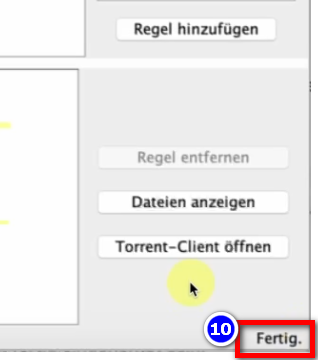
- <span style="background-color: rgb(251, 238, 184);">“Kla.TV-Downloader” ዝብል መደብ ዓጽዩ እንደገና ክፈቶ → ሕጂ ኣብ ታሕቲ የማን ❿ “Done”።</span>  
      
    [![grafik.png](https://wiki.kla.tv/uploads/images/gallery/2024-11/scaled-1680-/84bPGOJXwVAXo7fR-grafik.png)](https://wiki.kla.tv/uploads/images/gallery/2024-11/84bPGOJXwVAXo7fR-grafik.png)
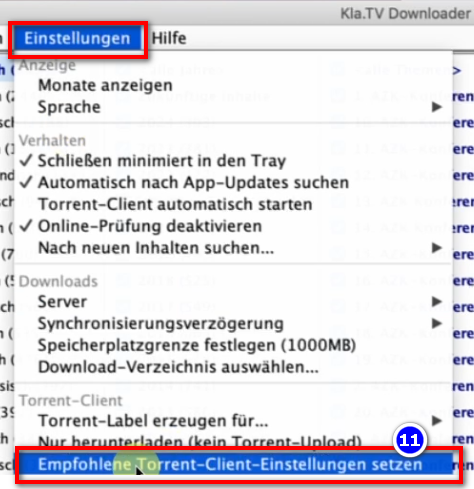
- <span style="background-color: rgb(251, 238, 184);">ኣብቲ መደብ ❿❶ KlaTV-Downloader ናብቲ menu bar → Settings → ዝምከሩ ናይ torrent client ቅጥዕታት ኣቐምጥ (ኩሎም ቅኑዓት ቅጥዕታት ብኣውቶማቲክ ክኣትዉ እዮም) ንኺድ።</span>  
      
    [![grafik.png](https://wiki.kla.tv/uploads/images/gallery/2024-11/scaled-1680-/gqloWaqFD8o7LbNg-grafik.png)](https://wiki.kla.tv/uploads/images/gallery/2024-11/gqloWaqFD8o7LbNg-grafik.png)


### <span style="background-color: rgb(241, 196, 15);">**6. ምትእስሳር፤**</span>

<p class="callout info">እቲ KlaTV downloader ሕግታት ምትእስሳር ወሲኹ ናብ qBittorrent ይሰዶም፡ ድሕሪኡ ድማ ነቶም መደባት ኩሉ ግዜ እዋናዊ ንኽኾኑ የውርዶም። እዚ ማለት፦ እቲ KlaTV downloader ብኸመይን እንታይን ክወርድ ከም ዘለዎ ጥራይ ይገልጽ፣ qBittorrent ድማ ነቲ ናይ ምውራድ ስራሕ ይወስዶ።</p>

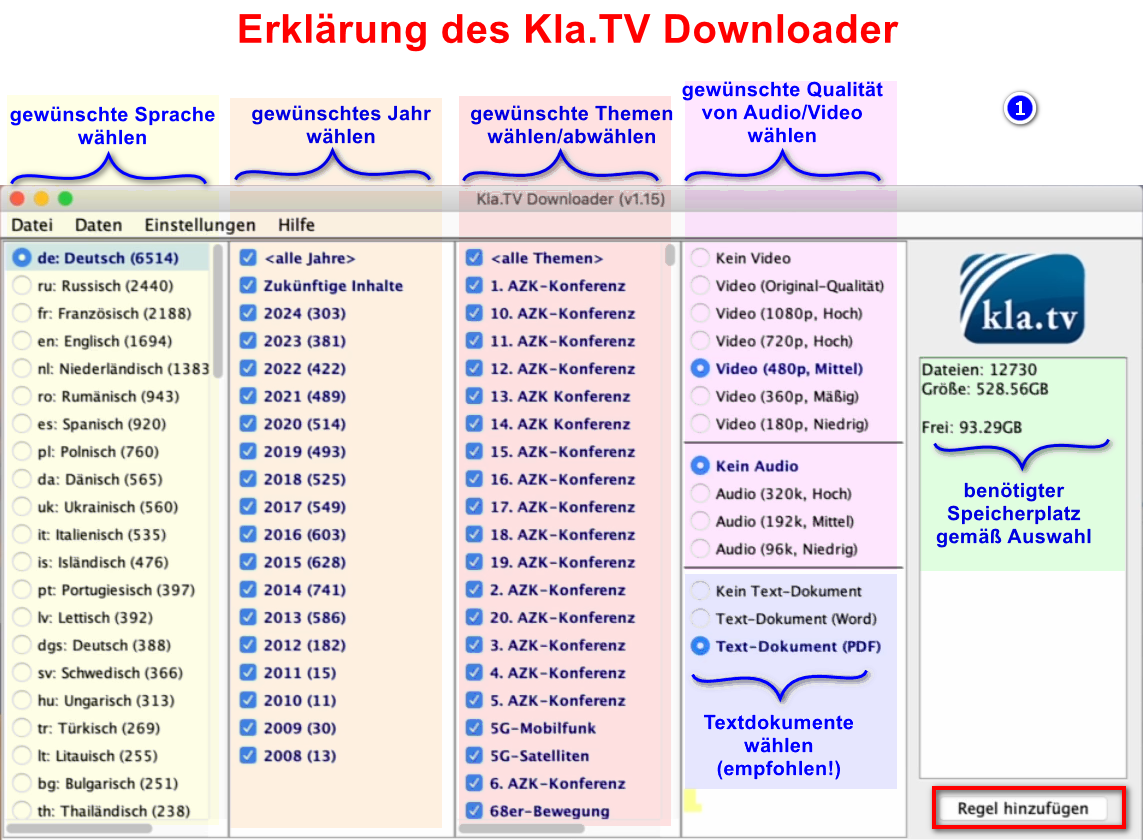
- <span style="background-color: rgb(251, 238, 184);">ነቲ kla.TV Downloader ክፈቶ → ዝደለኻዮ ❶ ሕግታት ምረጽ። (መብርሂ፡ ስእሊ ርአ)</span>  
    [![grafik.png](https://wiki.kla.tv/uploads/images/gallery/2024-11/scaled-1680-/Q9Op8e0KGpDAFHm6-grafik.png)](https://wiki.kla.tv/uploads/images/gallery/2024-11/Q9Op8e0KGpDAFHm6-grafik.png)
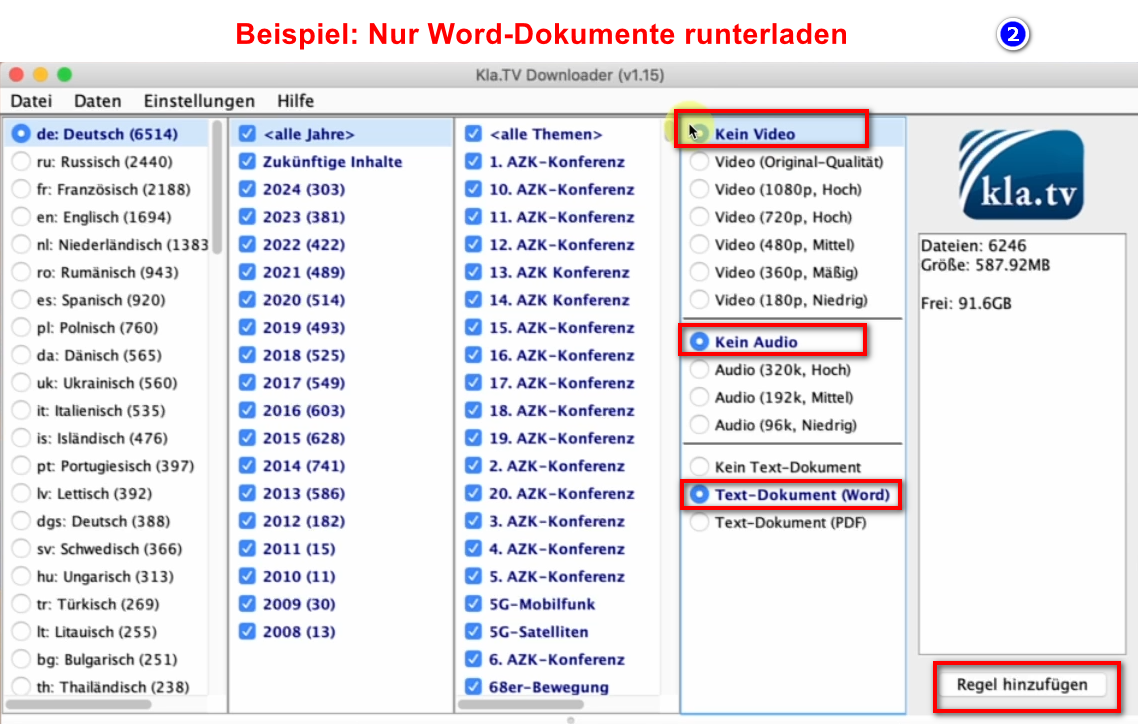
- <span style="background-color: rgb(251, 238, 184);">ብዙሓት ባህርያት ክትመርጽ እንተደሊኻ፡ ነቲ "ሕጊ ምውሳኽ" ብተኸታታሊ ብዙሕ ግዜ ክትፍጽሞ ኣለካ። እዚ ሕቶ እዚ ድሕሪኡ ናብ qBittorrent ይለኣኽ እሞ ካብኡ ይወርድ።</span>  
    
    - <span style="background-color: rgb(251, 238, 184);">ብናይ ወርድ ፋይላት ጥራይ ሓድሽ ሕጊ ክትፈጥር እንተደሊኻ ኣብነት ኣብዚ ኣሎ። ድሕሪኡ ቪድዮ/ድምጺ ዲኣክቲቭ ብምግባር፡ ዝደለኹሞ ዓመታት ምረጽ እሞ ነቲ ሕጊ ወስኸሉ።</span>  
        [![grafik.png](https://wiki.kla.tv/uploads/images/gallery/2024-11/scaled-1680-/MyrlhWDMHW4eBhyZ-grafik.png)](https://wiki.kla.tv/uploads/images/gallery/2024-11/MyrlhWDMHW4eBhyZ-grafik.png)
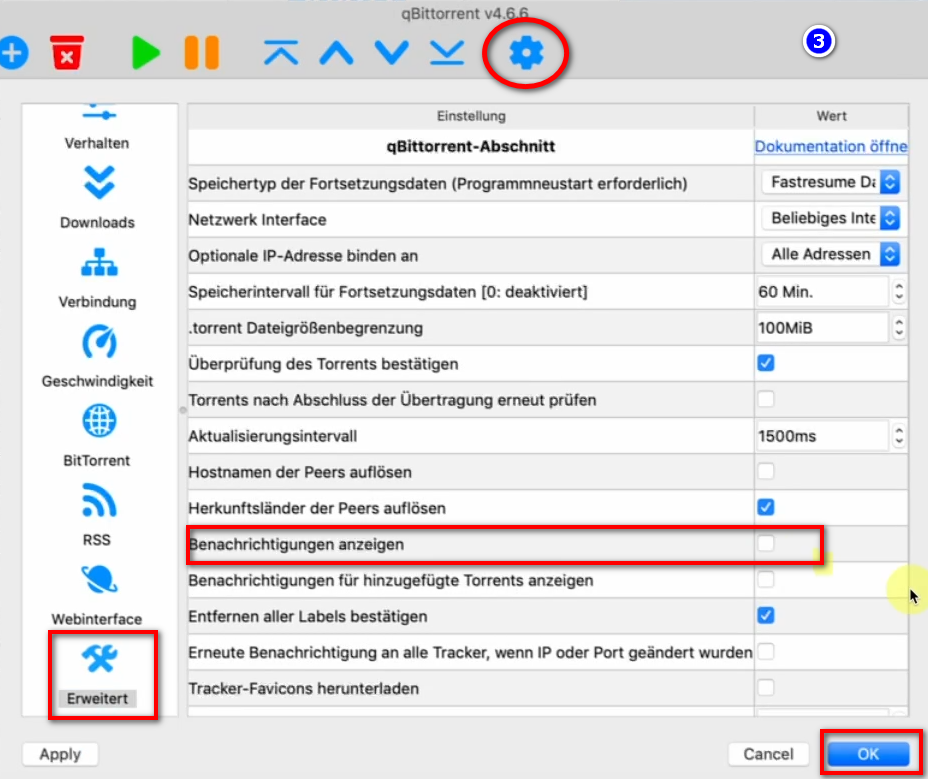
- <span style="background-color: rgb(251, 238, 184);">ንነፍሲ ወከፍ ዝተወርደ ቪድዮ ፖፕ-ኣፕ መልእኽቲ ንኸይመጽእ → ናብ ❸ qBittorrent → Gear → Advanced → መፍለጢታት ኣርኢ → Disable → OK ኪድ</span> **[![grafik.png](https://wiki.kla.tv/uploads/images/gallery/2024-11/scaled-1680-/6G1eB56aGCy3ji5X-grafik.png)](https://wiki.kla.tv/uploads/images/gallery/2024-11/6G1eB56aGCy3ji5X-grafik.png)**
- <span style="background-color: rgb(251, 238, 184);">**መደባት ተዓጽዮም ኣብ ድሕሪት ምጽዓን ክቕጽሉ ይኽእሉ**</span>
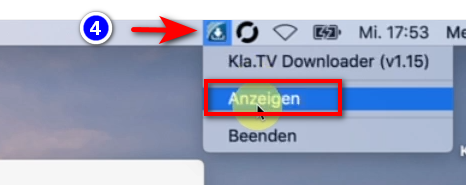
- <span style="background-color: rgb(251, 238, 184);">ነቲ ፕሮግራም ብመንገዲ ርእሲ ❹ ዳግማይ ክትከፍቶ ትኽእል ኢኻ።</span> **[![grafik.png](https://wiki.kla.tv/uploads/images/gallery/2024-11/scaled-1680-/H0S0ZQ0639Lk5hWA-grafik.png)](https://wiki.kla.tv/uploads/images/gallery/2024-11/H0S0ZQ0639Lk5hWA-grafik.png)**


### <span style="background-color: rgb(241, 196, 15);">**6. እቲ ምጽዓን ንኻልኦት ሰባት ዝበጽሕ ምግባር፤**</span>

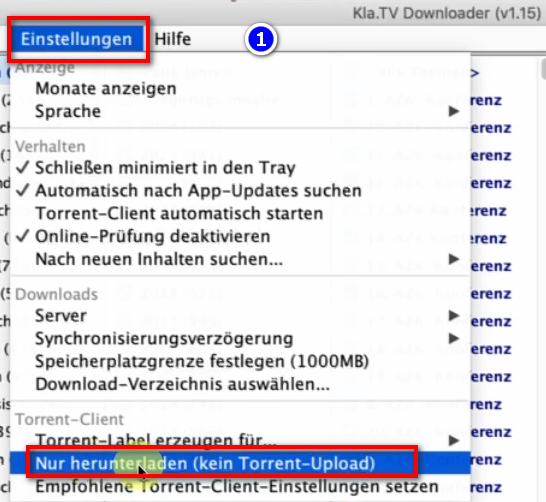
- <span style="background-color: rgb(251, 238, 184);">ብነባሪ መልክዑ qBittorrent ንኹሎም ዝተወርዱ ፋይላት ንኻልኦት ሰባት ከም ዝቐርቡ ይገብሮም። ብዝኾነ ምኽንያት እዚ እንተዘይደሊኹም ክትዓጽዎ ትኽእሉ ኢኹም።  
    </span>
- <span style="background-color: rgb(251, 238, 184);">ክፈት ❶ qBittorrent → ቅጥዕታት → ምውራድ ጥራይ (ቶረንት ምጽዓን የለን)</span> **[![grafik.png](https://wiki.kla.tv/uploads/images/gallery/2024-11/scaled-1680-/TTyJJDELOuYYB7pb-grafik.png)](https://wiki.kla.tv/uploads/images/gallery/2024-11/TTyJJDELOuYYB7pb-grafik.png)**

### <span style="background-color: rgb(241, 196, 15);">**7. ለበዋ፡- ኮምፒተር ብኣውቶማቲክ ከይትዓጽው ናይ ሓይሊ ኣማራጺታት ምቕማጥ፤**   
</span>

<p class="callout info">እዚ መደብ እዚ ኩሉ ኣብ ቦትኡ ክሳብ ዝበጽሕ ሓያሎ መዓልታት ክወስድ ይኽእል እዩ። ነዚ መስርሕ ንምቅልጣፍ ሞድ ምቑጣብ ሓይሊ ምጥፋእ ይምከር</p>

- <span style="background-color: rgb(251, 238, 184);">ኮምፒተር ዳግማይ ምስ ተጀመረት፡ ነቲ ኣፕሊኬሽን ዳግማይ ክትጅምሮ ኣለካ (መምርሒታት ነጥቢ 8 ርአ)።</span>
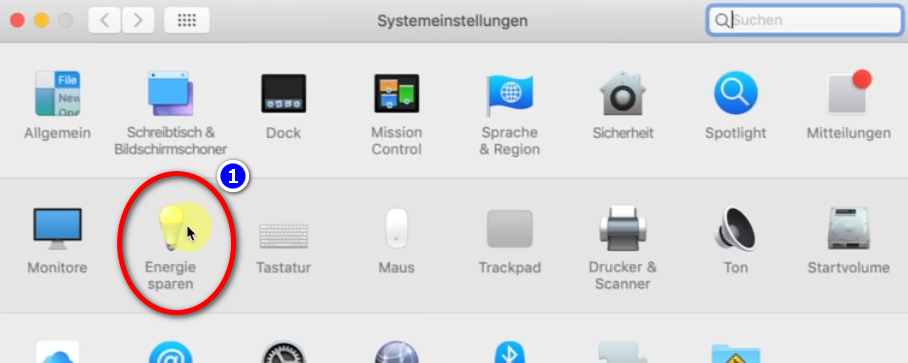
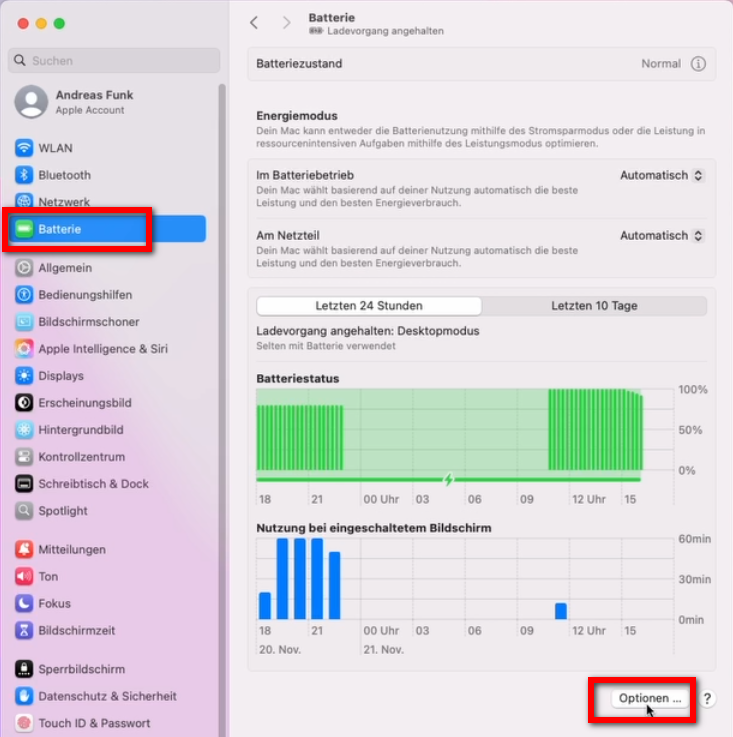
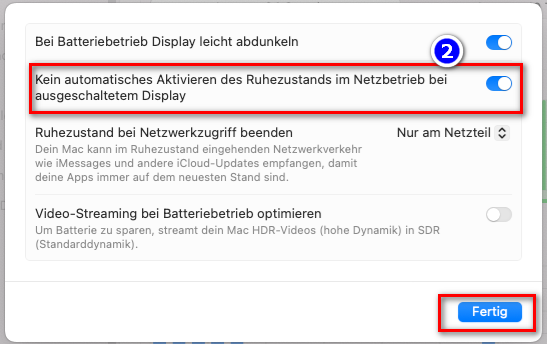
- <span style="background-color: rgb(251, 238, 184);">ማክካ ብኣውቶማቲክ ከይዓጽው ንምክልኻል፡ ማክ → ምርጫታት ስርዓት → ምቑጣብ ጸዓት →  
    ❷ ኣውቶማቲክ ድቃስ ሞድ የለን... → Enable</span>
- <span style="background-color: rgb(251, 238, 184);">ኩሎም ፋይላት ክሳብ ዝወርድ ኮምፒተር ክትሰርሕ ግደፎ</span>
- [![grafik.png](https://wiki.kla.tv/uploads/images/gallery/2024-11/scaled-1680-/23U7rqFWbWlhJ5Uv-grafik.png)](https://wiki.kla.tv/uploads/images/gallery/2024-11/23U7rqFWbWlhJ5Uv-grafik.png)  
    <span style="background-color: rgb(251, 238, 184);">ኣብ ሓደስቲ ማክስ፤</span>
    
    [![grafik.png](https://wiki.kla.tv/uploads/images/gallery/2024-11/scaled-1680-/gmOpiNFU9gKHn9B0-grafik.png)](https://wiki.kla.tv/uploads/images/gallery/2024-11/gmOpiNFU9gKHn9B0-grafik.png)
    
    [![grafik.png](https://wiki.kla.tv/uploads/images/gallery/2024-11/scaled-1680-/PGDWa65L7V1hj21V-grafik.png)](https://wiki.kla.tv/uploads/images/gallery/2024-11/PGDWa65L7V1hj21V-grafik.png)
### <span style="background-color: rgb(241, 196, 15);">**8. ነቲ ፕሮግራም ዳግማይ ንጅምሮ፣ ድሕሪ ሪቦት ንኮምፒተር / ማህደር update ንገብሮ** </span>

- <span style="background-color: rgb(251, 238, 184);">ኮምፒተርካ ዳግማይ ምስ ጀመርካዮ፡ ናይ ምውራድ ፕሮግራማትካ ክዕጸዉ እዮም። መስርሕ ምውራድ ንምቕጻል ክልቲኡ መደባት (❶ KlaTV-Downloaderን ❷ qBittorrentን) ዳግማይ ክትከፍቶ ኣለካ። ድሕሪኡ እቲ መስርሕ ምውራድ ብኣውቶማቲክ ይሰርሕ።</span>  
      
    **[![grafik.png](https://wiki.kla.tv/uploads/images/gallery/2024-11/scaled-1680-/IjhxA7jMF7QCHpDT-grafik.png)](https://wiki.kla.tv/uploads/images/gallery/2024-11/IjhxA7jMF7QCHpDT-grafik.png)[![grafik.png](https://wiki.kla.tv/uploads/images/gallery/2024-11/scaled-1680-/DPiy0yNoIIVHuK7d-grafik.png)](https://wiki.kla.tv/uploads/images/gallery/2024-11/DPiy0yNoIIVHuK7d-grafik.png)**
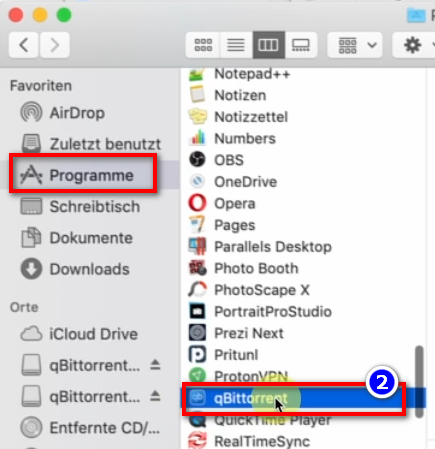
- <span style="background-color: rgb(251, 238, 184);">**እዞም ክልተ ፕሮግራማት ብስሩዕ ክፈቶም ምእንቲ እቶም ሓደስቲ ፕሮግራማት ብኣውቶማቲክ ናብ ሃርድ ድራይቭካ ክወርዱ።**</span>

### <span style="background-color: rgb(241, 196, 15);">**9. update ምትካል፤** </span>

- **<span style="background-color: rgb(251, 238, 184);">በብእዋኑ እቲ KlaTV downloader optimized ስለዝኾነ ነቲ update ክትጭብጦ ይግባእ። ከምዚ እዩ ዝሰርሕ፤  
    </span>**
- <span style="background-color: rgb(251, 238, 184);">Kla.TV Downloader ዝብል ክፈቶ</span>
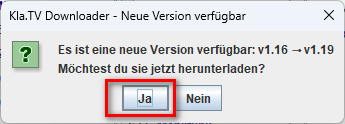
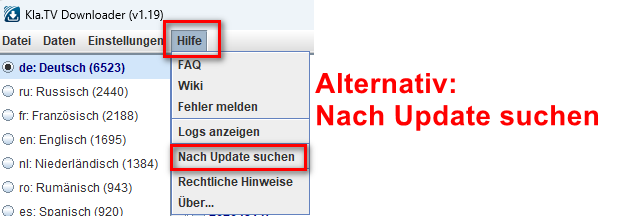
- <span style="background-color: rgb(251, 238, 184);">እዚ መልእኽቲ እዚ ይመጽእ፦ (እንተዘይኮይኑ ናብ Kla.TV Downloader → Help → Updates መርምሩ</span>  
    [![grafik.png](https://wiki.kla.tv/uploads/images/gallery/2024-12/scaled-1680-/CPxIwgY3Aw6GYURU-grafik.png)](https://wiki.kla.tv/uploads/images/gallery/2024-12/CPxIwgY3Aw6GYURU-grafik.png)
    
    [![grafik.png](https://wiki.kla.tv/uploads/images/gallery/2024-12/scaled-1680-/YaiCj1fp8YsCOMGW-grafik.png)](https://wiki.kla.tv/uploads/images/gallery/2024-12/YaiCj1fp8YsCOMGW-grafik.png)
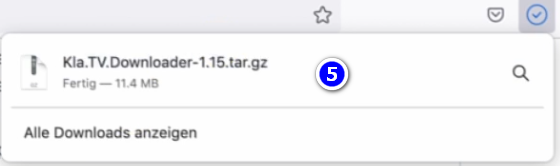
- <span style="background-color: rgb(251, 238, 184);">ኢንተርነት ይኽፈት፡ ናብ “Assets” ንታሕቲ ንኺድ → ኣብ ❹ “Kla.TV.Downloader-\*.\*\*.tar.gz” ጠውቕ።</span>
    - [![grafik.png](https://wiki.kla.tv/uploads/images/gallery/2024-11/scaled-1680-/xKO8pwvIyzzKFFa6-grafik.png)](https://wiki.kla.tv/uploads/images/gallery/2024-11/xKO8pwvIyzzKFFa6-grafik.png)
    - <span style="background-color: rgb(251, 238, 184);"><span lang="DE" style="font-size: 16pt; line-height: 107%; font-family: Wingdings; background-color: rgb(251, 238, 184);"><span style="mso-char-type: symbol; mso-symbol-font-family: Wingdings;"><span lang="EN-US" style="font-size: 11pt; line-height: 107%; font-family: 'Cambria Math', serif; background-color: rgb(251, 238, 184);">❺ ፕሮግራም ከፊትካ ምፍናው → ጎተት ንኣብነት። ናብ ❻ ዴስክቶፕ</span></span></span></span>  
          
        ![grafik.png](https://wiki.kla.tv/uploads/images/gallery/2024-11/scaled-1680-/fqkvJohFv6e5fZeD-grafik.png)[![grafik.png](https://wiki.kla.tv/uploads/images/gallery/2024-11/scaled-1680-/fgT1bYzgnnG9BTgh-grafik.png)](https://wiki.kla.tv/uploads/images/gallery/2024-11/fgT1bYzgnnG9BTgh-grafik.png)
    
    
    - <span style="background-color: rgb(251, 238, 184);">ናብቲ ኣብ ዴስክቶፕና ዘሎ Kla.TV-Downloader ዝብል ማህደር ብምኻድ start-downloader-mac.command ዝብል ትእዛዝ ክፈቶ</span>[![grafik.png](https://wiki.kla.tv/uploads/images/gallery/2024-12/scaled-1680-/vZn1x5u9UzFI8eE7-grafik.png)](https://wiki.kla.tv/uploads/images/gallery/2024-12/vZn1x5u9UzFI8eE7-grafik.png)
    - ኣብቲ ❷ ናይ መጠንቀቕታ መልእኽቲ "OK" ዝብል ጠውቕ  
        [![grafik.png](https://wiki.kla.tv/uploads/images/gallery/2024-11/scaled-1680-/ctWjfFgcE6oNtDZi-grafik.png)](https://wiki.kla.tv/uploads/images/gallery/2024-11/ctWjfFgcE6oNtDZi-grafik.png)

    
    
    - <span style="background-color: rgb(251, 238, 184);">ናይ Mac's System Preferences ክፈት → ❸ "Security &amp; Privacy" ጽሓፍ (ኣብ ሓደስቲ Macs ናብ: Privacy and Security ንኺድ) → ኣብ ትሕቲ "Allow apps to download from" ❹ "Open anyway" → ❺ Open ዝብል ጠውቕ</span> **[![grafik.png](https://wiki.kla.tv/uploads/images/gallery/2024-11/scaled-1680-/4QHcwAGwlXxVJpfH-grafik.png)](https://wiki.kla.tv/uploads/images/gallery/2024-11/4QHcwAGwlXxVJpfH-grafik.png)[![grafik.png](https://wiki.kla.tv/uploads/images/gallery/2024-11/scaled-1680-/7PJo5iZ9CpX9xGP4-grafik.png)](https://wiki.kla.tv/uploads/images/gallery/2024-11/7PJo5iZ9CpX9xGP4-grafik.png)[![grafik.png](https://wiki.kla.tv/uploads/images/gallery/2024-11/scaled-1680-/8DkrZiRyz2KlOO2K-grafik.png)](https://wiki.kla.tv/uploads/images/gallery/2024-11/8DkrZiRyz2KlOO2K-grafik.png)**


- <span style="background-color: rgb(251, 238, 184);">ነቲ ናይ ቀደም ስሪት ደምስሶ፡ ነቲ ሕጂ ዘሎ Kla.TV downloader እንደገና ከፊትካ ነቲ optimized version ኣስተማቕሮ 😊</span>

##### ካልኦት ክጥዕሙኻ ዝኽእሉ ጽሑፋት፤  
  
[ዝተዓቀበ ማህደር ዳህሰስ](https://wiki.kla.tv/books/klatv/page/archive)