# "Kla.TV-Offline" பதிவிறக்கம் செய்து புதுப்பித்த நிலையில் வைத்திருங்கள் 🔄

# Keep "Kla.TV-Offline" up-to-date by means of Filezilla (Mac,Linux,Windows)

This video explains how this works:


<div class="responsive-iframe" id="bkmrk--1"><iframe allowfullscreen="allowfullscreen" frameborder="0" height="332" src="https://www.kla.tv/index.php?a=showembed&vidid=37260#s=en" width="590"></iframe>

</div>
### <span style="color: rgb(255, 255, 255);">**<span style="background-color: rgb(29, 62, 98);"><span style="background-color: rgb(45, 194, 107);"><span style="background-color: rgb(29, 62, 98);"> WinSCP or FileZilla?</span></span> </span>**</span>

#### <span style="color: rgb(255, 255, 255);">**<span style="background-color: rgb(164, 0, 0);"> 1 </span> <span style="background-color: rgb(29, 62, 98);"><span style="background-color: rgb(45, 194, 107);"><span style="background-color: rgb(29, 62, 98);"> </span></span>Download FileZilla </span>**</span>

<span style="color: rgb(29, 62, 98);">First you need the installation file. You can download it by clicking on the link below:</span>

<p class="callout success">**[CLICK HERE (https://filezilla-project.org/download.php)](https://www.heise.de/download/product/filezilla-18785/download/danke?id=a7ddf635-1e21-48f4-9add-e7612e13c3b2)**</p>

#### <span style="color: rgb(255, 255, 255);">**<span style="background-color: rgb(164, 0, 0);"> 2 </span> <span style="background-color: rgb(29, 62, 98);"><span style="background-color: rgb(45, 194, 107);"><span style="background-color: rgb(29, 62, 98);"> </span></span>Install FileZilla </span>**</span>

#### <span style="color: rgb(255, 255, 255);">**<span style="background-color: rgb(164, 0, 0);"> 3 </span> <span style="background-color: rgb(29, 62, 98);"><span style="background-color: rgb(45, 194, 107);"><span style="background-color: rgb(29, 62, 98);"> </span></span>Connect FileZilla with the Server </span>**</span>

#### <span style="color: rgb(255, 255, 255);">**<span style="background-color: rgb(164, 0, 0);"> 4 </span> <span style="background-color: rgb(29, 62, 98);"><span style="background-color: rgb(45, 194, 107);"><span style="background-color: rgb(29, 62, 98);"> </span></span></span>**</span><span style="color: rgb(255, 255, 255);">**<span style="background-color: rgb(29, 62, 98);">Synchronize your archive</span>**</span><span style="color: rgb(255, 255, 255);">**<span style="background-color: rgb(29, 62, 98);"> </span>**</span>

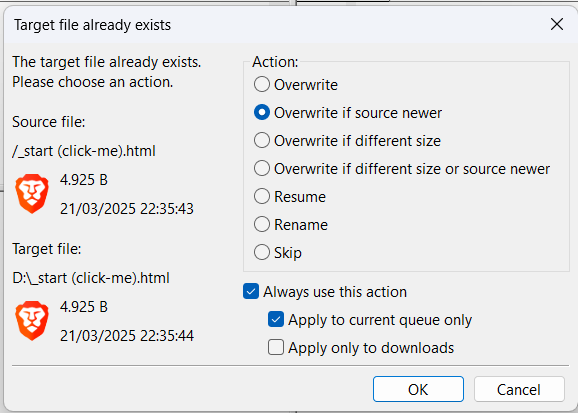
<div class="responsive-iframe" id="bkmrk--3"></div><div class="responsive-iframe" id="bkmrk--4"></div>[![Screenshot 2025-04-24 200358.png](https://wiki.kla.tv/uploads/images/gallery/2025-04/BOEHNSeLHY1bQ8hR-screenshot-2025-04-24-200358.png)](https://wiki.kla.tv/uploads/images/gallery/2025-03/FMg5KlE97WgkdEbI-grafik.png)

### <span style="color: rgb(255, 255, 255); background-color: rgb(164, 0, 0);"> **Finished!** </span>

# Keep “Kla.TV-Offline” up to date using WinSCP (Windows only)

<p class="callout info"><span style="color: rgb(0, 0, 0);">**WinSCP can slow down the download speed. We therefore recommend using FileZilla to download the entire archive: [https://wiki.kla.tv/books/klatv-offline/page/klatv-offline-aktuell-halten-mittels-filezilla-maclinuxwindows](https://wiki.kla.tv/books/en-klatv-offline/page/keep-klatv-offline-up-to-date-by-means-of-filezilla-maclinuxwindows)  
We recommend WinSCP for the update.**</span></p>


### <span style="color: rgb(255, 255, 255);">**<span style="background-color: rgb(29, 62, 98);"><span style="background-color: rgb(45, 194, 107);"><span style="background-color: rgb(29, 62, 98);"> WinSCP or FileZilla?</span></span> </span>**</span>

#### <span style="color: rgb(255, 255, 255);">**<span style="background-color: rgb(29, 62, 98);"><span style="background-color: rgb(45, 194, 107);"><span style="background-color: rgb(120, 210, 40);"> 1 </span></span></span> <span style="background-color: rgb(29, 62, 98);"><span style="background-color: rgb(45, 194, 107);"><span style="background-color: rgb(29, 62, 98);"> </span></span>Download WinSCP   
</span>**</span>

First you need the installation file. You can download this by clicking on the link:

<p class="callout success">**[CLICK HERE (https://winscp.net/download.php)](https://winscp.net/download.php "Link zum Download")**</p>

#### <span style="color: rgb(255, 255, 255);">**<span style="background-color: rgb(29, 62, 98);"><span style="background-color: rgb(45, 194, 107);"><span style="background-color: rgb(120, 210, 40);"> 2 </span></span></span> <span style="background-color: rgb(29, 62, 98);"><span style="background-color: rgb(45, 194, 107);"><span style="background-color: rgb(29, 62, 98);"> </span></span>Install WinSCP </span>**</span>

#### <span style="color: rgb(255, 255, 255);">**<span style="background-color: rgb(29, 62, 98);"><span style="background-color: rgb(120, 210, 40);"> 3 </span></span> <span style="background-color: rgb(29, 62, 98);"> Connect WinSCP to the server </span>**</span>

#### <span style="color: rgb(255, 255, 255);">**<span style="background-color: rgb(29, 62, 98);"><span style="background-color: rgb(120, 210, 40);"> 4 </span></span> <span style="background-color: rgb(29, 62, 98);"> Set up the program   
</span>**</span>

#### <span style="color: rgb(255, 255, 255);">**<span style="background-color: rgb(29, 62, 98);"><span style="background-color: rgb(120, 210, 40);"> 5 </span></span> <span style="background-color: rgb(29, 62, 98);"> Synchronize your archive   
</span>**</span>

<div class="responsive-iframe" id="bkmrk-einstellungen-f%C3%BCrs-s"><div class="responsive-iframe">  
</div><div class="responsive-iframe">**Settings for synchronization:**</div></div>[![Screenshot 2025-04-24 203839.png](https://wiki.kla.tv/uploads/images/gallery/2025-04/PS62AZ43ZtZepwm9-screenshot-2025-04-24-203839.png)](https://wiki.kla.tv/uploads/images/gallery/2025-03/sfc7JRnnMHPMUm9C-nummerierung.png)

[![Screenshot 2025-04-24 203744.png](https://wiki.kla.tv/uploads/images/gallery/2025-04/scaled-1680-/4MeV2oNJFXst3k7d-screenshot-2025-04-24-203744.png)](https://wiki.kla.tv/uploads/images/gallery/2025-04/4MeV2oNJFXst3k7d-screenshot-2025-04-24-203744.png)

### <span style="color: rgb(255, 255, 255);">**<span style="background-color: rgb(29, 62, 98);"><span style="background-color: rgb(120, 210, 40);"> DONE   
</span></span>**</span>

# Keep “Kla.TV-Offline” up to date with the Kla.TV-Downloader App

The Kla.TV downloader app is still under development and does not yet support this function.