# ES_Kla.TV OFFLINE

Kla.TV OFFLINE es TODO el archivo de Kla.TV en más de 85 idiomas en tu ordenador/disco duro. También puedes usarlo y compartirlo completamente sin acceso a Internet (offline).

# Descarga «Kla.TV-Offline» y mantenla actualizada 🔄).

# "Kla.TV-Offline" aktuell halten mittels WinSCP (nur Windows)

<p class="callout info"><span style="color: rgb(0, 0, 0);">**WinSCP kann die Downloadgeschwindigkeit drosseln. Deshalb empfehlen wir für den Download des gesamten Archivs FileZilla zu benutzen: [https://wiki.kla.tv/books/klatv-offline/page/klatv-offline-aktuell-halten-mittels-filezilla-maclinuxwindows](https://wiki.kla.tv/books/klatv-offline/page/klatv-offline-aktuell-halten-mittels-filezilla-maclinuxwindows)  
Für die Aktualisierung empfehlen wir WinSCP.**</span></p>

### <span style="color: rgb(255, 255, 255);">**<span style="background-color: rgb(29, 62, 98);"><span style="background-color: rgb(45, 194, 107);"><span style="background-color: rgb(29, 62, 98);"> WinSCP oder FileZilla?</span></span> </span>**</span>

<div class="responsive-iframe" id="bkmrk-"><div class="responsive-iframe"><iframe allowfullscreen="allowfullscreen" frameborder="0" height="332" src="https://video.elaion.ch?video_by_id=Y6hgJ5GqI9HF" width="590"></iframe>

</div></div>## <span style="color: rgb(255, 255, 255);">**<span style="background-color: rgb(29, 62, 98);"><span style="background-color: rgb(45, 194, 107);"><span style="background-color: rgb(120, 210, 40);"> 1 </span></span></span> <span style="background-color: rgb(29, 62, 98);"><span style="background-color: rgb(45, 194, 107);"><span style="background-color: rgb(29, 62, 98);"> </span></span>Lade dir WinSCP herunter </span>**</span>

<span style="color: rgb(29, 62, 98);">Als erstes benötigst du die Installationsdatei. Diese kannst du herunterladen, indem du auf den Link klickst:</span>

<p class="callout success">**[HIER KLICKEN (https://winscp.net/download.php)](https://winscp.net/download.php "Link zum Download")**</p>

### <span style="color: rgb(255, 255, 255);">**<span style="background-color: rgb(29, 62, 98);"><span style="background-color: rgb(45, 194, 107);"><span style="background-color: rgb(120, 210, 40);"> 2 </span></span></span> <span style="background-color: rgb(29, 62, 98);"><span style="background-color: rgb(45, 194, 107);"><span style="background-color: rgb(29, 62, 98);"> </span></span>Installiere WinSCP </span>**</span>

<div class="responsive-iframe" id="bkmrk--1"><div class="responsive-iframe"><div class="responsive-iframe"><iframe allowfullscreen="allowfullscreen" frameborder="0" height="332" src="https://video.elaion.ch?video_by_id=dstOOAKwP42S" width="590"></iframe>

</div></div></div>### <span style="color: rgb(255, 255, 255);">**<span style="background-color: rgb(29, 62, 98);"><span style="background-color: rgb(120, 210, 40);"> 3 </span></span> <span style="background-color: rgb(29, 62, 98);"> Verbinde WinSCP mit dem Server </span>**</span>

<div class="responsive-iframe" id="bkmrk--2"><div class="responsive-iframe"><div class="responsive-iframe"><div class="responsive-iframe"><div class="responsive-iframe"><iframe allowfullscreen="allowfullscreen" frameborder="0" height="332" src="https://video.elaion.ch?video_by_id=zIHLWmE6IDLc" width="590"></iframe>

</div></div></div></div></div>### <span style="color: rgb(255, 255, 255);">**<span style="background-color: rgb(29, 62, 98);"><span style="background-color: rgb(120, 210, 40);"> 4 </span></span> <span style="background-color: rgb(29, 62, 98);"> Richte dir das Programm ein </span>**</span>

<div class="responsive-iframe" id="bkmrk--3"><div class="responsive-iframe"><div class="responsive-iframe"><iframe allowfullscreen="allowfullscreen" frameborder="0" height="332" src="https://video.elaion.ch?video_by_id=xfW3b7YO99pJ" width="590"></iframe>

</div></div></div>### <span style="color: rgb(255, 255, 255);">**<span style="background-color: rgb(29, 62, 98);"><span style="background-color: rgb(120, 210, 40);"> 5 </span></span> <span style="background-color: rgb(29, 62, 98);"> Synchronisiere dein Archiv </span>**</span>

<div class="responsive-iframe" id="bkmrk-einstellungen-f%C3%BCrs-s"><div class="responsive-iframe"><iframe allowfullscreen="allowfullscreen" frameborder="0" height="332" src="https://video.elaion.ch?video_by_id=ptENtxtTdsm7" width="590"></iframe>

</div><div class="responsive-iframe">  
</div><div class="responsive-iframe"><span style="color: rgb(29, 62, 98);">**Einstellungen fürs synchronisieren:**</span></div></div>[![NUmmerierung.png](https://wiki.kla.tv/uploads/images/gallery/2025-03/scaled-1680-/sfc7JRnnMHPMUm9C-nummerierung.png)](https://wiki.kla.tv/uploads/images/gallery/2025-03/sfc7JRnnMHPMUm9C-nummerierung.png)

### <span style="color: rgb(255, 255, 255);">**<span style="background-color: rgb(29, 62, 98);"><span style="background-color: rgb(120, 210, 40);"> FERTIG </span></span>**</span>

# "Kla.TV-Offline" aktuell halten mittels Filezilla (Mac,Linux,Windows)

### <span style="color: rgb(255, 255, 255);">**<span style="background-color: rgb(29, 62, 98);"><span style="background-color: rgb(45, 194, 107);"><span style="background-color: rgb(29, 62, 98);"> WinSCP oder FileZilla?</span></span> </span>**</span>

<div class="responsive-iframe" id="bkmrk-"><iframe allowfullscreen="allowfullscreen" frameborder="0" height="332" src="https://video.elaion.ch?video_by_id=kpdtcAOfuvJJ" width="590"></iframe>

</div>### <span style="color: rgb(255, 255, 255);">**<span style="background-color: rgb(164, 0, 0);"> 1 </span> <span style="background-color: rgb(29, 62, 98);"><span style="background-color: rgb(45, 194, 107);"><span style="background-color: rgb(29, 62, 98);"> </span></span>Lade dir FileZilla herunter </span>**</span>

<span style="color: rgb(29, 62, 98);">Als erstes benötigst du die Installationsdatei. Diese kannst du herunterladen, indem du auf den Link klickst:</span>

<p class="callout success">**[HIER KLICKEN (https://filezilla-project.org/download.php)](https://www.heise.de/download/product/filezilla-18785/download/danke?id=a7ddf635-1e21-48f4-9add-e7612e13c3b2)**</p>

### <span style="color: rgb(255, 255, 255);">**<span style="background-color: rgb(164, 0, 0);"> 2 </span> <span style="background-color: rgb(29, 62, 98);"><span style="background-color: rgb(45, 194, 107);"><span style="background-color: rgb(29, 62, 98);"> </span></span>Installiere FileZilla </span>**</span>

<div class="responsive-iframe" id="bkmrk--1"><iframe allowfullscreen="allowfullscreen" frameborder="0" height="332" src="https://video.elaion.ch?video_by_id=ooaSN6vpGIsw" width="590"></iframe>

</div>### <span style="color: rgb(255, 255, 255);">**<span style="background-color: rgb(164, 0, 0);"> 3 </span> <span style="background-color: rgb(29, 62, 98);"><span style="background-color: rgb(45, 194, 107);"><span style="background-color: rgb(29, 62, 98);"> </span></span>Verbinde FileZilla mit dem Server </span>**</span>

<div class="responsive-iframe" id="bkmrk--2"><iframe allowfullscreen="allowfullscreen" frameborder="0" height="332" src="https://video.elaion.ch?video_by_id=ssTqOfALDzy5" width="590"></iframe>

</div>### <span style="color: rgb(255, 255, 255);">**<span style="background-color: rgb(164, 0, 0);"> 4 </span> <span style="background-color: rgb(29, 62, 98);"><span style="background-color: rgb(45, 194, 107);"><span style="background-color: rgb(29, 62, 98);"> </span></span></span>**</span><span style="color: rgb(255, 255, 255);">**<span style="background-color: rgb(29, 62, 98);">Synchronisiere dein Archiv</span>**</span><span style="color: rgb(255, 255, 255);">**<span style="background-color: rgb(29, 62, 98);"> </span>**</span>

<div class="responsive-iframe" id="bkmrk--3"><iframe allowfullscreen="allowfullscreen" frameborder="0" height="332" src="https://video.elaion.ch?video_by_id=TvhAmobR5TYt" width="590"></iframe>

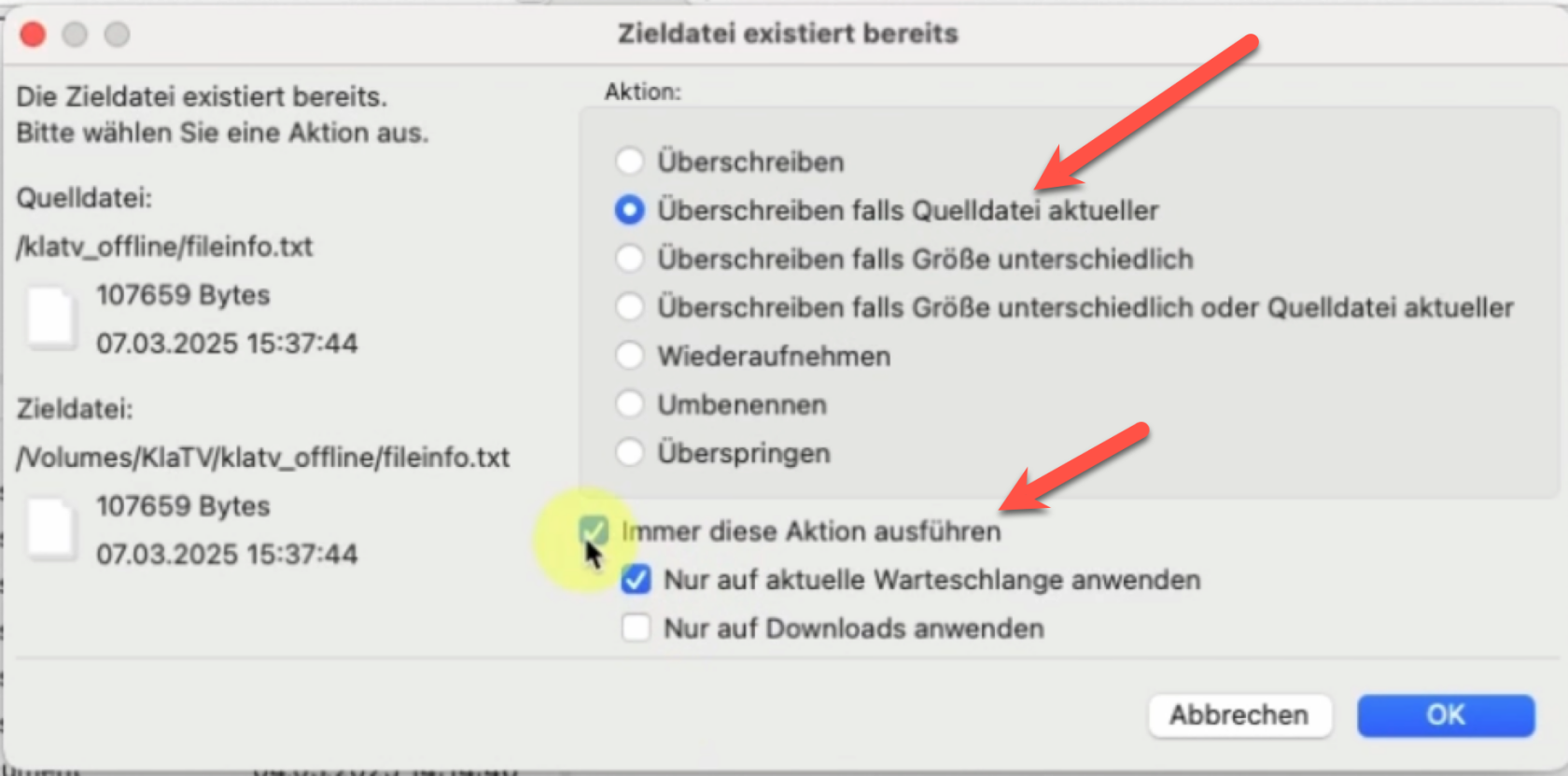
</div><div class="responsive-iframe" id="bkmrk--4"></div>[![grafik.png](https://wiki.kla.tv/uploads/images/gallery/2025-03/scaled-1680-/FMg5KlE97WgkdEbI-grafik.png)](https://wiki.kla.tv/uploads/images/gallery/2025-03/FMg5KlE97WgkdEbI-grafik.png)

### <span style="color: rgb(255, 255, 255); background-color: rgb(164, 0, 0);"> **FERTIG** </span>

# "Kla.TV-Offline" aktuell halten mittels Kla.TV-Downloader App

Die Kla.TV-Downloader App ist noch in Entwicklung und unterstützt diese Funktion noch nicht.

# Instrucciones técnicas

# Descargar «Kla.TV-Offline» mediante acceso al servidor

<div class="syno-json" data-json="{"id":"2U6jcMQqYq","contentType":"floating_object","items":[{"mode":"follow_destination","slice":{"content":[{"type":"image_box","attrs":{"transform":{"left":63.29719201428361,"top":53.31683168316832,"width":915.6144972295394,"height":207.92079207920793,"deg":0,"skewY":0},"__id":"P1AYwFLOAI"},"content":[{"type":"image","attrs":{"file_id":"AI3BL6H9IP5UJDCABS9T36J7IO","alt":"KlaTV-Offline_Logo_v02.png","img_transform":{"skewY":0,"deg":0,"height":1,"width":1,"top":0,"left":0},"absolute_url":"https://desk.elaion.ch/oo/file/1204_V09SFUF6DH7F76NQ1GPHO8S9UC.slide/AI3BL6H9IP5UJDCABS9T36J7IO/img?tid=%22LjFxG6ah5ozhOXrnlOEQSQ9ZO3IHkb6rk3294urORjaEfBOFuj00TnB5sIL5t15Vwp47nf2HZJDwAhgi%22"}}]}],"openLeft":0,"openRight":0}},{"mode":"follow_source","slice":{"content":[{"type":"image_box","attrs":{"transform":{"left":63.29719201428361,"top":53.31683168316832,"width":915.6144972295394,"height":207.92079207920793,"deg":0,"skewY":0},"__id":"P1AYwFLOAI"},"content":[{"type":"image","attrs":{"file_id":"AI3BL6H9IP5UJDCABS9T36J7IO","alt":"KlaTV-Offline_Logo_v02.png","img_transform":{"skewY":0,"deg":0,"height":1,"width":1,"top":0,"left":0},"absolute_url":"https://desk.elaion.ch/oo/file/1204_V09SFUF6DH7F76NQ1GPHO8S9UC.slide/AI3BL6H9IP5UJDCABS9T36J7IO/img?tid=%22LjFxG6ah5ozhOXrnlOEQSQ9ZO3IHkb6rk3294urORjaEfBOFuj00TnB5sIL5t15Vwp47nf2HZJDwAhgi%22"}}]}],"openLeft":0,"openRight":0}}]}" id="bkmrk-">  
</div><div id="bkmrk--1" pm-open-left="0"><div>[![KlaTVoffline_logo.png](https://wiki.kla.tv/uploads/images/gallery/2025-03/scaled-1680-/fPsvZD4JmXw2SfNs-klatvoffline-logo.png)](https://wiki.kla.tv/uploads/images/gallery/2025-03/fPsvZD4JmXw2SfNs-klatvoffline-logo.png)</div></div>## **1. ¿qué es Kla.TV-Offline?**


<table border="1" id="bkmrk-kla.tv-archiv-in-85-" style="border-collapse: collapse; width: 107.037%; height: 555px;"><colgroup><col style="width: 26.9481%;"></col><col style="width: 36.7108%;"></col><col style="width: 36.3412%;"></col></colgroup><tbody><tr style="height: 99.467px; border-color: rgb(53, 152, 219); background-color: rgb(53, 152, 219);"><td colspan="3" style="height: 99.467px;">### <span style="color: rgb(236, 240, 241);">**Dein Kla.TV-Archiv**</span>

</td></tr><tr style="height: 240.333px;"><td style="height: 240.333px;">- ##### <span style="color: rgb(35, 111, 161);">**in 85 Sprachen**</span>
- ##### <span style="color: rgb(35, 111, 161);">**auf deiner Festplatte**</span>


</td><td colspan="2" style="height: 240.333px;"><div pm-open-left="0"><div>[![KlaTVOffline_Festplatte.png](https://wiki.kla.tv/uploads/images/gallery/2025-03/scaled-1680-/zRBAkGMV0UA3Ce8M-klatvoffline-festplatte.png)](https://wiki.kla.tv/uploads/images/gallery/2025-03/zRBAkGMV0UA3Ce8M-klatvoffline-festplatte.png)  
</div></div></td></tr><tr style="height: 184.9px; background-color: rgb(194, 224, 244); border-color: rgb(53, 152, 219);"><td style="height: 184.9px;">##### **Über 25.000 Videos** 

- Video in niedriger Qualität
- Text
- Quellenangabe
- Tondatei
- Bilddatei

</td><td style="height: 184.9px;">##### **Integrierte "Offline-Website"** 

- zum Suchen und Finden   
    aller Video

</td><td style="height: 184.9px;">##### **2TB benötigter Speicherplatz**

- Eine Festplatte mit **2 TB** (TeraByte) Speicherplatz oder mehr.

</td></tr></tbody></table>

## **2. "Kla.TV-Offline" aktuell halten**

<div id="bkmrk--5" pm-open-left="0"><div>Mit Kla.TV offline hast du die Möglichkeit das komplette Sendungsarchiv von Kla.TV herunterzuladen. Doch was wäre ein Archiv, wenn du es nicht *<span style="text-decoration: underline;">aktuell</span>* halten kannst?   
  
</div><div>In diesen beiden Artikeln erfährst du, wie du dein "Kla.TV-Offline"-Archiv auf deinem Rechner / deiner Festplatte ganz einfach aktuell halten kannst:  
  
</div></div><p class="callout info">**"Kla.TV-Offline" aktuell halten mittels WinSCP (nur Windows)** [https://wiki.kla.tv/books/klatv-offline/page/klatv-offline-aktuell-halten-mittels-winscp-nur-windows](https://wiki.kla.tv/books/klatv-offline/page/klatv-offline-uber-serverzugang-aktuell-halten-mittels-winscp-nur-windows)  
</p>

<p class="callout info">**"Kla.TV-Offline" aktuell halten mittels Filezilla (Mac,Linux,Windows)**  
[https://wiki.kla.tv/books/klatv-offline/page/klatv-offline-aktuell-halten-mittels-filezilla-maclinuxwindows](https://wiki.kla.tv/books/klatv-offline/page/klatv-offline-aktuell-halten-mittels-filezilla-maclinuxwindows)</p>